

Element window contact displays the actual status of one or more windows. Therefore, as well EIS 1 (1Bit) as EIS 14 (1 Byte) object can be used.
CONTROL L support
The element can also be used for CONTROL L.
Specific parameters:
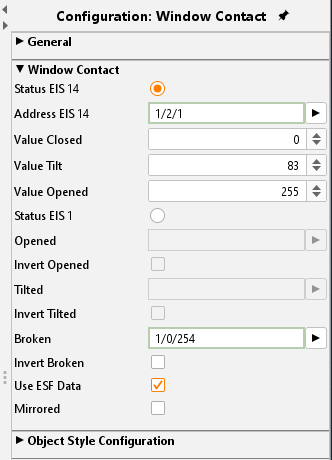
Status EIS 14(*)
The window contact is watched by an EIS14 object. In this case a value for each status “Open”, “Closed”, “Tilted” is set. The object for “Broken” is the only one which is active in “Status EIS 1” even if in selection “Status EIS 14”.
Status EIS 1
If this status is activated there are three objects each for “Open”, “Tilted” and “breakage of glass”. Using the “Invert” flag the objects can be inverted.
Settings
The parameters serve for more specific settings:
Use ESF data:
if this flag is activated ESF data (out of the ETS) are used as tooltip resp. mouse-over-help.
Mirror Image:
If this flag is enabled, the representation of the item displayed mirrored.
Object style configuration
All other options are described in chapter General Element Parameter.
(*) Note: The selected position values for the window position are usually specified by the manufacturer with 0 (closed), 83 (tilted) and 255 (open). You can also use your own position values. In addition, with the help of logic functions, value ranges can be converted into a position value, e.g. value range 1 to 83 as a window position “Tilted” in order to display it.