

It is a visualization element for displaying collective signal which has been configured in LOGIKEDITOR.
CONTROL L support
The element is compatible to use for visualization CONTROL L.
Specific parameter:
In addition to the general element parameters, there are element-specific parameters. These determine on which group addresses the required values are sent.
Static Collective Signal
EIS 14u group address of the static collective signal.
The visualization element changes its appearance depending on the telegram value:
-
0: White (no collective signal)
-
1: Red (static colour) or alternate between red and white (flashing) (collective signal present).
-
2: Blue (collective signal is acknowledged but not reset yet).
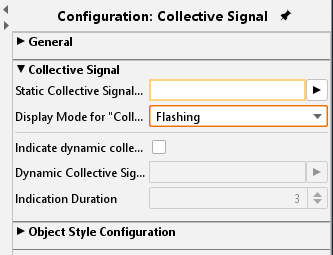
Display Mode for Collective Signal
This makes the selection how the static collective signal is displayed for status “Collective Signal Present”.
It is automatically set to “Static” when “indicate Dynamic Collective Signal” is activated.
-
Static: Visualization element turns red.
-
Flashing: Visualization element flashes between red and white.
Indicate dynamic collective signal
Hereby it activates dynamic collective signal indication.
Dynamic Collective Signal (group address)
Enter group address (EIS1) for the dynamic collective signal. The visualization element flashes for a configurable amount of time. Each time a “1” is sent to this address.
Indication Duration
Enter time value (in seconds) how long the dynamic collective signal is indicated.
Object style configuration
All other options are described in chapter General Element Parameter.