

Element “value display” as well serves as displaying element as also as operational element. It is possible to send out values. Nearly all EIS types are available.
The values can be formatted freely, and the element can be designed individually.
CONTROL L Support
This element can also be used for CONTROL L.
Specific parameters
Address / Data type
Nearly all within the KNX Standard existing data types are available. These are:
-
EIS 5 (2 Byte FP), floating point digit
-
EIS 6 (1 Byte), percent value
-
EIS 9 (4 Byte FP), floating point digit accordance to IEEE
-
EIS 10s (2 Byte, signed)
-
EIS 10u (2 Byte, unsigned
-
EIS 11s (4 Byte, signed)
-
EIS 11u (4 Byte, unsigned)
-
EIS 14s (1 Byte, signed)
-
EIS 14u (1 Byte, unsigned)
-
DPT 29 (8 Byte signed)
-
DPT 6.010 (1 Byte signed)
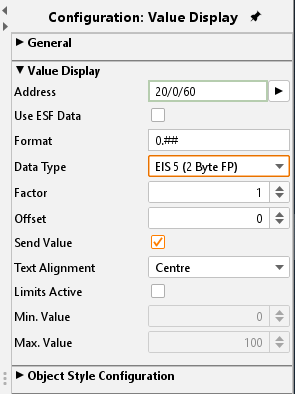
Use ESF Data
Check this box if you want to see in the visualization of the identifier used by the group address from the ETS as a tooltip.
Format
Here the received value can be formatted as wanted. Additionally, a unit can be added.
Therefore, the following parameters must be used:
-
# = optional
-
0 = obliging
So if a „0“ is set this digit is displayed whether if the input value is existing or not. If a „#“ is set the digit is only displayed when an input value is existing.
Example
The input value it 23,4 (degrees). The value display shall show 2 digits behind the comma and the unit symbol. The settings must look like this:
##.00 °C
So the value display element shows 23,40 °C.
Factor / Offset
The value can be multiplied with a factor and an offset can be added. Incoming values can be converted in the desired format/ unit.
Send value
The element can be used as operational element. In this case the labelling “Edit” occurs on the element. The user is enabled to interfere into operation.
Text alignment
Sets the position on which the value is displayed; the “edit” labelling remains on the original position.
Activate limits
This limits the value range the user can send out. An example for use is shifting temperatures.
Object style configuration
All other options are described in chapter General Element Parameter.