

The temperature switch serves for changing temperature values. The user is enabled to increase or decrease the values in predefined steps. By defining a background or using a graphics set the switch can be designed individually.
CONTROL L support
The element can also be used for CONTROL L.
Specific parameters:
Address
Communication object for this visualisation object.
Note: To use the element as setpoint shifting, it is necessary to consider the settings of the respective RTR controller (e.g., Classic Job Editor). When using an absolute setpoint shift, the data type is used EIS5 (DPT9.001, 2-byte values) and for the relative setpoint shift it is the data type EIS 14s (DPT 6.010, 1-byte values).
Use ESF Data
Check this box if you want to see in the visualization of the identifier used by the group address from the ETS as a tooltip.
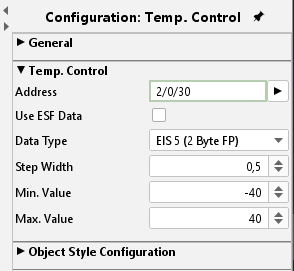
Data type
Possible data types are EIS 5 (DPT9.0xx, 2Byte values) or EIS 14 (DPT 6.010 1 byte values). The wanted data type can be selected from a dropdown menu.
Step width
Here it is defined by which value the default/ last value will be changed. Because the values are floating point values, also decimal places can be used. The default setting for the increment is 0.5.
Min. / Max. value
These two values define the range between minimum and maximum temperature. Even negative values are possible.
Object style configuration
You can align the button horizontal as well as vertical. All other options are described in chapter General Element Parameter.