

This element serves for accessing the room allocation plan module. So, if a caretaker is enabled to operate the room allocation out of the visualization. Detailed explanations and documentation of the occupancy plan module is on the CD or provided on http://www.bab-tec.de to download.
CONTROL L Support
This element is not displayed in the CONTROL L. Currently it has no CONTROL L support.
Select room
Different rooms being generated in the occupancy plan module can be selected here out of a dropdown menu. Element “room” is named with the title of the room and its assigned colour.
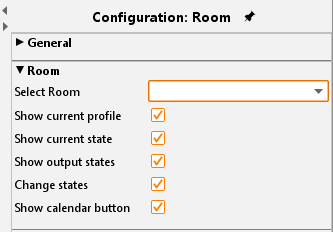
Checkbox
The checkboxes serve for configuration of the visualization element. According to information can be found in the occupancy plan module.
Display active profile:
Displays the active profile of the room.
Display active status:
Displays the active status of the room.
Display exits:
All exits and their status are displayed
Change status:
An additional button “Set State” appears on the element. Using this button, the user can change (via dropdown menu) the status of the room for a defined period.
Display calendar:
An additional button “Open Calendar” appears on the element. Using the button the user is enabled to access the configuration module (“Profile”, “calendar” and “generated data”). The access level is set in the occupancy plan module. (=> Please refer to the respective documentation).