

Based on the EIS 15 Text-element the EIS 15 Display-element offers some more possibilities of use. So, several messages can be buffered and messages can be sent. The element background can be customized.
CONTROL L support
The element can also be used for CONTROL L.
Specific parameters
Address EIS15 Text
This input object receives an EIS15 value (corresponds to DPT 16,000) - a text up to 14 bytes long.
The received text is displayed, for example, as a message, status display or status in the visualisation.
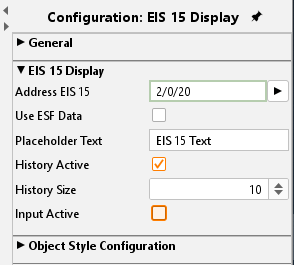
Use ESF Data
Check this box if you want to see in the visualization of the identifier used by the group address from the ETS as a tooltip.
Wild card
Here a default text can be typed in. This text will be displayed if no telegram is received.
Recording
If this option is selected the element records incoming telegrams. The number of recordings is set by the input line „recording length“. Default setting is „10“.
Input active
If the checkbox is activated the element can send EIS 15 text messages. Therefore, the element has to be activated by mouse click. An input box opens and the text can be typed in.
Object style configuration
All other options are described in chapter General Element Parameter.