

This element displays date and/or time within visualization. Time information is sent by the respective group address to the element. The display style can be changed in several ways.
CONTROL L Unterstützung
Dieses Element kann auch für CONTROL L genutzt werden.
Specific parameters
Format
Is about the size setting determines what is displayed. There are four choices:
-
DATE – TIME: First the date and then the time has been displayed.
-
TIME – DATE: Vice versa, first the time is displayed in front of the date.
-
DATE: Only date has been displayed
-
TIME: Only the time appears.
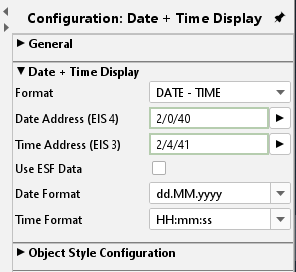
Address arrays
Here the group addresses are typed in. For date information it will be EIS4 and for time information EIS3. If the EIBPORT jobs “send time” and “send date” are active, the EIBPORT provides the information to the element.
Note: Please note that it is not necessary to send the time and date too often. Please use virtual group addresses if the link is only between job and visualisation.
Use ESF Data
Check this box if you want to see in the visualization of the identifier used by the group address from the ETS as a tooltip.
Date format / time format
In addition, you can decide this format in which the two values to be displayed. For this, the order in which the days, months and years to minutes, hours and seconds will be displayed by itself an abbreviation set. See also the Internet, keyword "SimpleDateFormat".
Object Style Configuration
Font style, size and colour are set here. Using the dialogue “style” individual styles can be defined and used later on within the project. If the individual style is changed these changes are automatically executed on all elements using the same style.
Ignore style / colour:
If the selected text shall get another colour as defined in the style set this can be done by activating the checkbox “ignore style”. A new colour can be selected from the array below.