

The graphic element can be used for layout purposes as well as for different functionalities.
CONTROL L Support
Not all functions of the element are supported in the CONTROL L. The following tasks are not supported:
-
Change Page PIN
-
Set eibPort clock
-
Open Room Allocation Plan
-
Local program
Settings
Element Type (style)
The Shape element has 3 different characteristics (styles). The wanted style can be selected from a dropdown menu.
-
Rectangle,
-
Rounded rectangle (adjustable corner radius),
-
Circle,
-
Triangle,
-
Rhombus,
-
Star and
-
Polygons (pentagon, hexagon, heptagon and
octagon).
Radius of the edges
If style „Rounded edges” is selected the radius of the edges can be set here (unit = px)
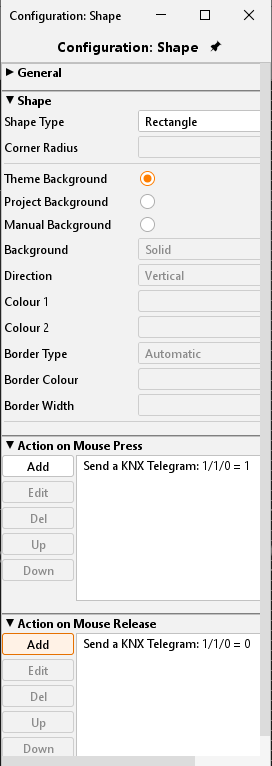
Functions
The Graphic element offers beneath its layout functionality some other functions which can be linked with the element directly. Therefor several actions can be defined. These actions will be executed when the element is pressed or released. Each function (press / release) just one action can be assigned to. It is not possible to define one action for „press“ and „release“ at the same time.
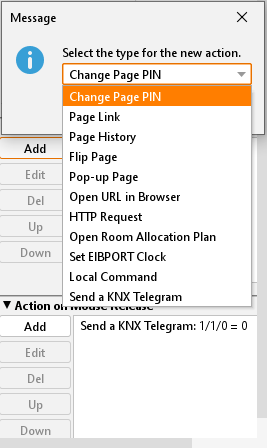
List of functions
Change Page PIN:
By clicking the corresponding graphical element the user has been requested to change the page PIN. Which PIN will be changed can be determined in the menu.
Page Link:
By “mouse-press” or “mouse-release” the page will be skipped. The target page has been defined in the pull-down menu.
Page History:
It is possible to navigate a page forward or backwards. This function is similar to the navigation in a internet browser. The navigation in the “forward” direction” only works if “backwards” is used before. “Page backwards” is depending on the chronic a user creates.
Flip Page:
Using this function a specific segment of a flip page can be called. So, it can be navigated without using the flip- element.
Open URL in Browser:
The desired URL will be requested if the element has been clicked.
HTTP-Request:
A predefined request has been sent. This can be used to control an IP-camera for example. Does not depend on the Job „HTTP-Request“. HTTP Basic authentication is possible by URL.
Open Room Allocation Plan:
The shape element has been used to open the visualisation element for the room allocation plan.
Set eibPort clock:
The dialogue for setting the EIBPORT clock has been displayed. It can enter time and date by hard or use the local machine’s time to set it.
Local program:
This function allows to start a locally installed program on the client PC. For this the command and the file to be executed can be selected.
Send telegram:
Enables EIS 1 or EIS 14 values to be sent when the graphic element is triggered.