The available visualization elements also include the components created with the COMPONENTBUILDER. On the one hand, these are components that were created with the integrated COMPONENTBUILDER 2 or, on the other hand, imported Free Components.
If free components have been created or integrated, these individually created control and visualization elements can be used to create the visualization.
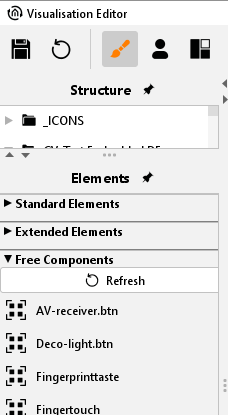
To do this, when selecting the visualization elements, go to the lower part of the “Free Components” selection. Here you will find your created and imported components.
The imported “Free Components” are displayed with a date extension (btn) and cannot be edited.
Basically, after every Free Components import and also if edited in the COMPONENTBUILDER, the display of the elements must be “Refresh”.
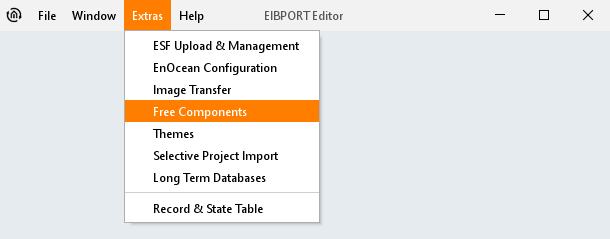
Free Components or Free Components Classic that were created with an older version of COMPONENTBUILDER (V1 or Classic) can be imported in the EIBPORT Editor under Extras -> Free Components.
The data import for Free Components is only for the use of these components in the visualization. Editing the created components is not possible. This requires importing directly into the integrated COMPONENTBUILDER V2. It is recommended that you always import the free components via the integrated COMPONENTBUILDER V2.
Under Free Components V2 are the created components that were created with the integrated version of COMPONENTBUILDER V2. This is opened via the EIBPORT start menu.
There is separate documentation for using the COMPONENTBUILDER V2.