

The blinds element serves as a control element for blinds. Blinds are controlled by EIS 7 (1Bit).
CONTROL L support
The element can also be used for CONTROL L.
Specific parameters
Objects
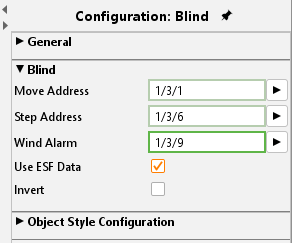
The element provides different objects. Not all of them have to be used.
Up / Down:
EIS 7 Object as “Move” command.
Ribs:
EIS 7 Object for blinds “Step” command.
Wind control:
EIS 1 object for wind control. If a telegram is sent on this object, the operation elements turn to red and cannot be used any more.
Functions
The element provides two more options:
Use ESF data:
if this flag is activated ESF data (out of the ETS) are used as tooltip resp. mouse-over-help.
Invert:
For use in some special controls, it is necessary to invert EIS 1 objects
Object style configuration
All other options are described in chapter General Element Parameter.