

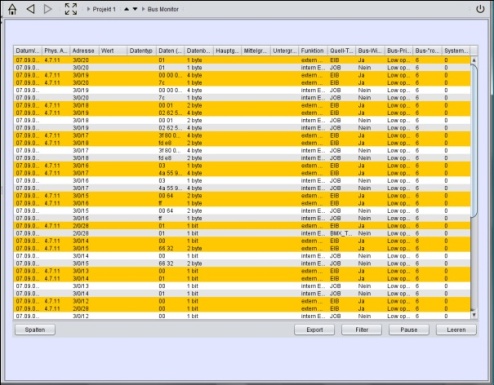
The Bus Monitor shows the actual telegram traffic within the KNX installation. The element can be embedded into the visualization or alternatively be opened in an external window. The content can be adjusted individually and by using operational elements the content can be changed and / or buffered while the visualization is running.
CONTROL L support
The element can’t be used for CONTROL L because it cannot be displayed there.
Specific parameters
External Window
If this option is activated the bus monitor will be opened in a separate window. If it is deactivated the depiction within the editor changes and the element must be positioned and scaled accordingly. The element, thereby changing their appearance.
Deactivate the option “maintain aspect ratio” in order to adjust the window to its environment.
Display operational elements
If this option is activated several operational elements are displayed on the visualization surface.
-
Column: by using this button columns can be added or removed.
-
Export: The displayed telegrams can be downloaded to the local PC (as csv- file).
-
Filter: By using the filter specific group addresses can be selected and displayed.
-
Break: Recording is suspended.
-
Void: The recordings of the Bus Monitor are deleted and recording starts again.
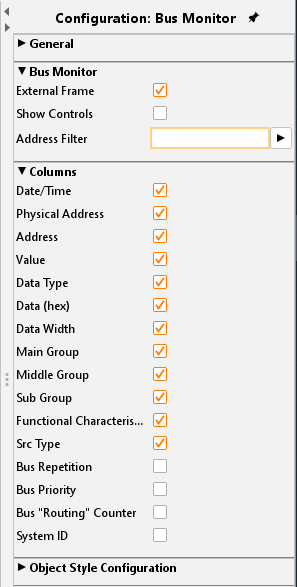
Address Filter
A specific address filter can already be entered during parametrization, then the bus monitor just displays the input address.
Columns
Using the checkboxes, the wanted columns can be activated. “Columns”„Bus Repeats”, “Bus Priority”, “Bus routing counter” and “System ID” are deactivated as default setting.
Date/Time:
Time and date of the KNX telegram.
Phys. Address:
The physical address of the KNX bus member (actuators, sensors, ...)
Address:
The group address of the telegram.
Value:
The value of the telegram. Will be converted bz using the data type.
Data type:
The EIS type formats. EIS types and their function:
-
EIS 1 (switching)
-
EIS 2 (dim)
-
EIS 3 (time)
-
EIS 4 (date)
-
EIS 5 (floating point)
-
EIS 6 (percent)
-
EIS 8 (priority)
-
EIS 9 (floating point)
-
EIS 10 (counter)
-
EIS 11 (counter)
-
EIS 14 (counter)
-
EIS 15 (text)
Data (hex):
The raw data, shown in hexadecimal format.
Data width:
Each EIS type has a different data width.
-
EIS 1 (1 Bit)
-
EIS 2 (1, 4, 8 Bit)
-
EIS 3 (3 Byte)
-
EIS 4 (3 Byte)
-
EIS 5 (16 Bit)
-
EIS 6 (1 Byte)
-
EIS 8 (2 Bit)
-
EIS 9 (32 Bit)
-
EIS 10 (16 Bit)
-
EIS 11 (32 Bit)
-
EIS 14 (8 Bit)
-
EIS 15 (14 Byte)
Main group:
The main group of the group address.
Middle group:
The middle group of the group address.
Subgroup:
The subgroup of the group address.
Function:
Describes the function of a telegram. The following functions exist:
-
Int_Frage
Internal requests about address and telegram states. The telegram will not be sent towards all subscribers and will not be recorded Note: The response of this request could be of any function. Switching telegrams will not be executed at this moment.
-
Int_Antwort
Internal response of the server. Includes the last not internal telegram of the particular address. The telegram will not be sent towards all subscribers and will not be recorded. It is used to initialise program modules. -
Int_Schalt
Internal switching command to the server. Telegram is stored in the record table without sending it out to other subscribers. -
Int_ExFrage
Internal request about a stored telegram state. If there is no value stored the request will be handled like an "Ext_Frage”. If a stored value is detected, the content is sent by an "Int_Antwort”. -
Ext_Frage
Public request about an address state of a telecontrol system. This telegram will be sent to all subscribers including the telecontrol system. The request will be recorded as the last state of the address. Record is directly overwritten by the response.
-
Ext_Antwort
Public response from the telecontrol system. Will be sent to all subscribers, will be recorded and saved as the last state of the address. Usually, the bus subscribers will interpret this telegram such as a switching one. -
Ext_Schalt
Public switching command. It can be triggered by all bus subscribers without having a request. -
Ext_Fehler
The public command was not transmitted correctly. Likely reason: missing ACK (acknowledge) from the sent-out telegram.
Source type:
All telegrams have a source. The following sources possible:
-
BMX_TCP e.g., from the visualization client
-
BMX_FC from the Job „facility coupling”.
-
KNX from the KNX
-
JOB sent out by a Job
-
(pre) KNXnet/IP routing from a ABB KNXnet/lP router (old ABB KNXnet/IP protocol)
-
KNXnet/IP routing from a KNXnet/lP router
-
BMX_UDP e.g. KNX telegrams sent by the HIC (old system, from webserver).
-
CGI from the CGI interface
-
xPL over the xPL protocol
Bus repetitions:
The telegram is repeated. That means that the telegram was not accepted by any subscribers.
Bus priority:
Shows the priority (in levels) of the KNX telegram.
-
0 System telegrams
-
1 Alarm telegrams
-
2 Telegrams with higher priority
-
3 Normal telegrams with low priority
Bus "routing" counter:
Standard value is 6. This means that the telegram is discarded after 6 lines-, area coupler or EIBPORT. With that an endless loop through the KNX avoided. The value 7 means that the telegram is indefinitely valid.
System ID:
The System ID is an explicit facility ID. It is used with facility coupling (possible values 0 to 255)
Object style configuration
All other options are described in chapter General Element Parameter.