

The temperature display shows the scheduled value and the actual temperature. For changing the scheduled value, the element can be linked with the temperature switch. Background and font style can be set individually.
CONTROL L support
The element can also be used for CONTROL L
Specific parameters
Input Objects
Both input objects have data type EIS 5. According to the KNX object structure several addresses can be joined to one object (=> chapter Object structure).
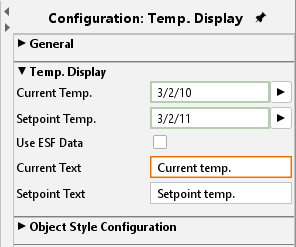
Use ESF Data
if this flag is activated ESF data (out of the ETS) are used as tooltip
Text
The text being displayed within the element can be edited in these two arrays. For instance instead of “actual temperature” it can be edited to “temperature”.
Object style configuration
All other options are described in chapter General Element Parameter.