

Element “Image” allows to place any graphic on the visualization surface. Not just graphics from the EIBPORT’s buffer but even from other sources (server etc) can be uploaded. Moreover, the display mode (yes / no) can be linked with an event.
CONTROL L support
The element can also be used for CONTROL L.
Specific parameters
Image from internal memory
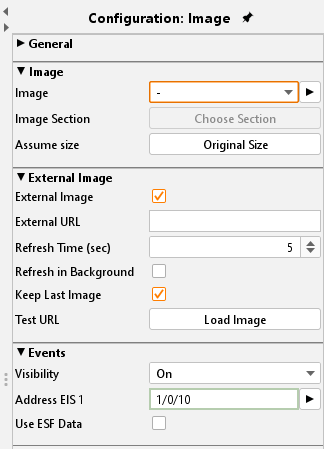
Via dialogue “Image” all graphics being loaded into the EIBPORT can be selected. Dialogue “Graphic Transfer” serves for uploading graphics into the device. The dialogue can be called via “Extras” > “Image transfer”, or alternatively using the arrows beside the drop down menu “Image”. Graphic files also can be drawn by drag and drop directly onto the visualization surface and are also available in the dropdown list.
Adopt size:
If the Image’s size was changed this button resizes it to the original gauge.
External image
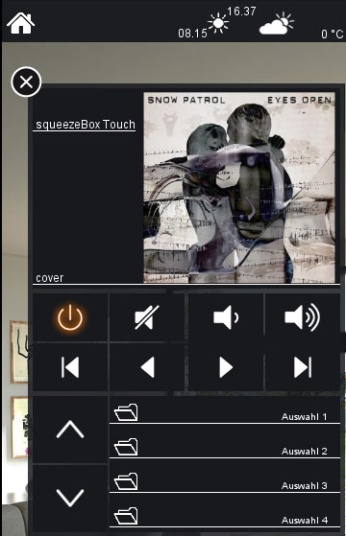
This element provides graphics being located on the client PC or on any server. So, it is possible to display an actual cover graphic while playing the music.
External URL:
The absolute path of the wanted file or web page must be typed in. If the file is located on the visualization PC the path has to begin with file://
In case of displaying a webpage, the complete URL beginning with http:// has to be typed in.
refresh in (sec.):
defines the time period for the automatic refresh of the webpage
Entering a “0” means “no refresh”
Background refresh:
If activated the URL will be refreshed in the background even if the visualization page is not active at the moment.
Display last frame:
If an external URL cannot be reached temporarily the last successfully loaded picture is displayed.
Check URL:
the reachability/ accessibility of the URL will be checked.
Event configuration
The visibility of each image can be controlled by an input object EIS1.
Visibility:
Defines the condition for visibility; “permanent”, “on” or “off”.
Address EIS 1:
If variant “on” or “off” are selected the address array will be released and can be configured
Use ESF data:
if this flag is activated ESF data (out of the ETS) are used as tooltip resp. mouse-over-help.
Realizing cover display in visualisation
By the external function call screen, there is the possibility that actual cover picture to the Squeezebox ™ Server played piece of music show. If the image exists, the server can be found at the following picture is available:
http://<server>:<port>/music/current/cover.jpg?player=<playerid>
This URL is extracted from http-Api of SqueezeCenter™ resp. SqueezeboxServer™ software. For a player ID, the assigned name of Squeezebox™ will be used. Assume SqueezeCenter™ resp. SqueezeboxServer™ software works on a server with the ip-address 192.168.1.10 on port 9002 and it is about a cover image of a song, which is just played on Squeezebox™ Boom (named sqbboom), the URL will be:
http://192.168.1.10:9002/music/current/cover.jpg?player=sqbboom
By adjustment of the picture element, it is to consider, that the picture could be refreshed indeed, but it will not have to reflect cover of the actual song, because displaying cover is not connected directly with music control. In case of that a music album doesn`t contain any information of cover, server software displays a wildcard.