

The visualization element can be used among others in CONTROL L. For this purpose, the element "camera archive" will be inserted into the respective page. The element can be edited in the configuration settings. Therewith the allocation to the respective archive takes place.
With "Recording)" the trigger of the logic element camera archives was inserted into the visualization. The "Status" is displaying the status of the logic element.
The camera archive of the visualization in the EIBPORT is not an approved or certified monitoring system. It is just a possibility for visualization and comfort improvement. For this reason, these functions, especially the trigger function, should be used moderately in order not having negative influence to other processes if the EIBPORT utilization is too high.
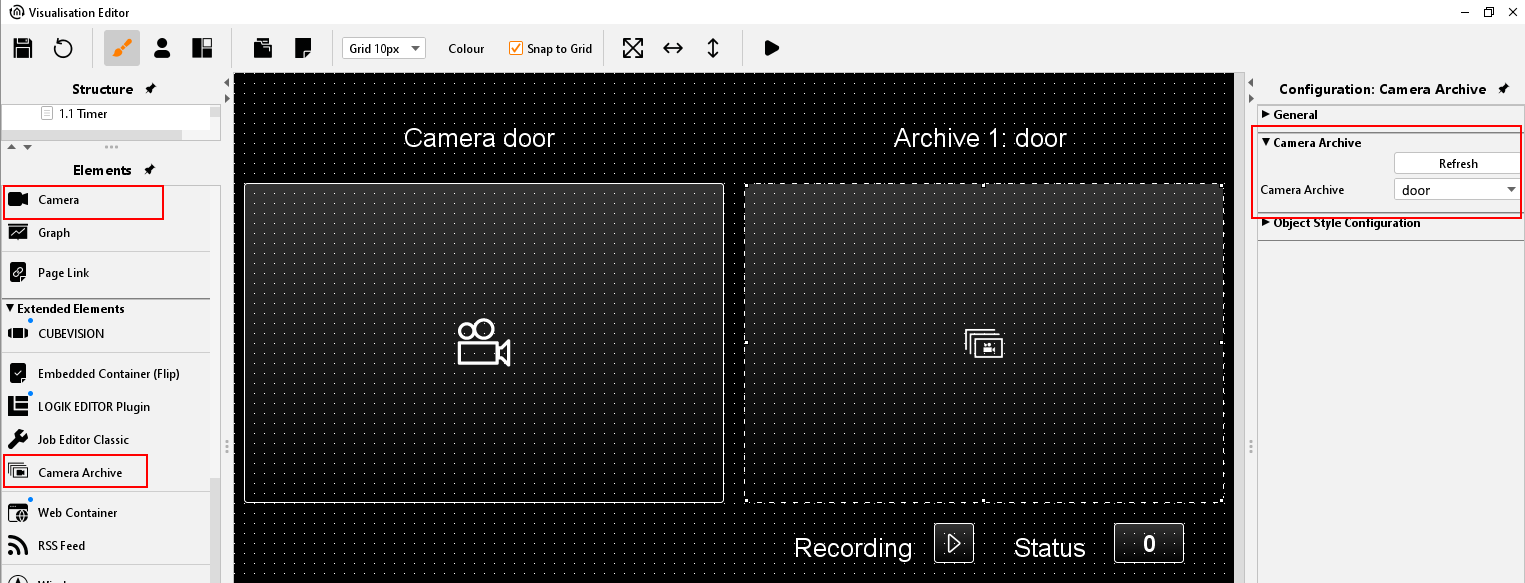
When activated in the visualization the camera archive will be opened and the recordings are displayed. The recordings can be played as a group or as a single image. Via the calendar function a selection can be made; an image export is also possible.
Note that this camera archive is not intended for security monitoring.
Please note that 1 image can be saved every 10 seconds at the most.
Note that the number of saved images increases the loading time of the images in the visualization.