

The bit bar is a display element for displaying the values of a status byte (bit mask). A byte consists of 8 bits, all of which can have the status 0 or 1. In the status byte, each of these bits provides information about a specific status.
To visualise this, there is this element in which each bit can be labelled separately.
The bit strip supports values up to 8 bytes.
CONTROL L support
The element can also be used for CONTROL L.
Specific parameters
Settings
Object
The element has an input object EIS 14 or 1 byte.
It also allows values up to 8 bytes.
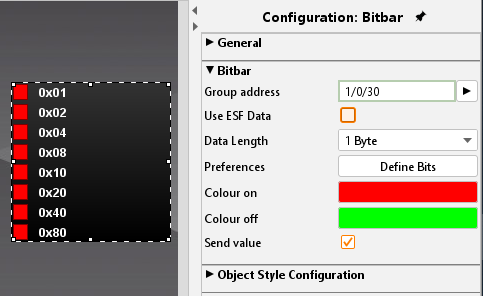
Beneath the input object there are 4 more settings possible:
Use ESF data:
if this flag is activated ESF data (out of the ETS) are used as tooltip resp. mouse-over-help.
Colour ON/ OFF:
Here a colour for each status can be set.
Send value:
The element changes from a displaying to a sending element when activating this checkbox.
Object style configuration
All other options are described in chapter General Element Parameter.