

This element displays the actual status of logics. The element shows just the status of the output or the status of all affected group addresses (input, release). Style and functionality can be set arbitrarily.
CONTROL L Unterstützung
Dieses Element kann auch für CONTROL L genutzt werden.
Specific parameters
Colour ON / OFF
These colour arrays define the status colour for status ON and OFF. The settings are valid for input and output.
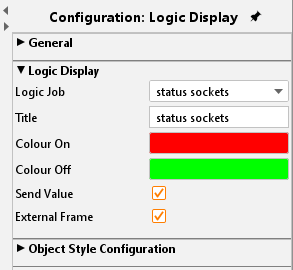
Send value
Like the value display element, the logics display element can be adapted to an operational element. The user is enabled to click onto the logics‘colour arrays to trigger a telegram for the wanted group address.
External Window
If this function is activated on the visualization surface just a one-line element is displayed. This element shows the status of the output by a colour array. When clicking on the element an external window opens and displays a complete overview (input, output, parameter….) for the logic element.
Object style configuration
All other options are described in chapter General Element Parameter.