This push button can execute different actions by repeated. So, after a second release in a defined period, not the same action will be executed, but also another one. This push button will be used for example in handicapped accessible homes.
CONTROL L support
The element can also be used for CONTROL L.
Specific parameter:
Beside general element parameter, some specific parameters of elements exist. These parameters determine the sequence push button`s performance.
Standard colour:
Defines the colour, which button will carry in standby mode.
Standard title:
The title is placed in centre and it is optional. Standard title will be displayed, when push button is in standby mode. Font style can be defined separately by a corresponding menu.
Delay (ms):
Delay decides the period, which must pass by, in order that sequence push button will return to standby mode. If it will be pushed a second time within this period, button will execute the next respective action.
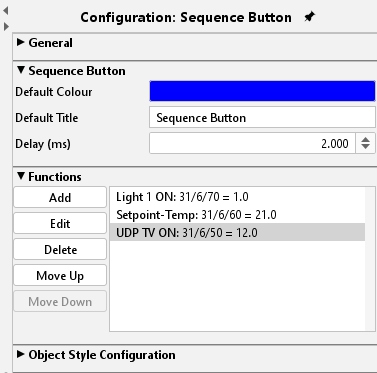
Function:
By menu item function, several actions could be defined, which the push button should perform. These actions will be executed from top to bottom. Configuration:
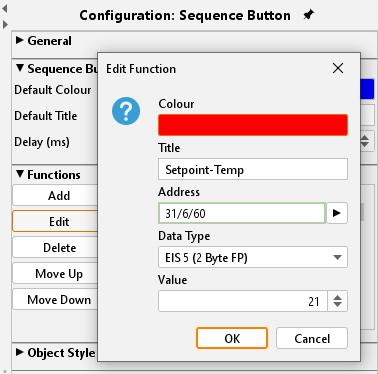
Colour:
Please define here the colour, which sequence push button should accept by executing of this action
Title:
title will be shown in sequence push button by executing this action. Font style is the same as you have defined in standard.
Address:
Group addresses can be enter neither by keyboard, nor they can be chosen out of a ESF file, loaded up before. Therefore, the arrow button, beside address input field, will serve. How you can load up one ESF file to your unit, you will learn in chapter ” ETS”.
Data type:
To every address a data type must be assigned. Following types are possible in here, EIS1, EIS5, EIS6 and EIS 14 (unsigned).
Value:
Here you decide the value, which must be sent. This value conforms to adjusted data type.
Object style configuration
All other options are described in chapter General Element Parameter.