

By this element, flip pages, which were created in folder “flip/dialogue pages” before, can be placed to a visualisation page. There you can determine, how many individual pages the flip page will imply and which function they will have.
CONTROL L support
The element can also be used for CONTROL L.
Settings
Specific parameter:
Beside general element parameters, specific parameters of elements exist. These determine the flip element`s appearance and performance on visualisation page.
-
Page selects: Please select here the desired flip/dialogue page, which should be placed on visualisation page.
-
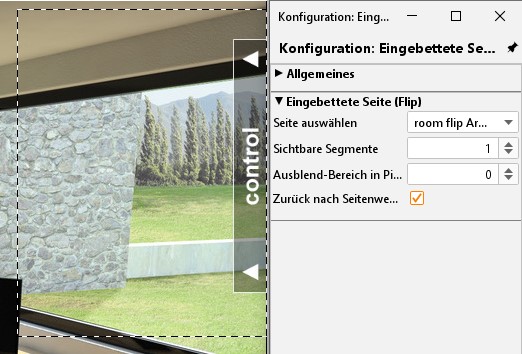
Visible page: Every flip page consists of 2 segments (single pages) at least. By the number field, you can adjust, how many segments could be regarded simultaneously. If only 2 segments are defined, only one segment should be visible, so that it can bring effect to slide into the other segment.
-
Fade-out area in pixel in this place, at the left and right margin, you can enter a range in pixel, in which respective vanishing segment will be faded out slowly. Fade-out area will be added to the actual size of corresponding segment.
Example
For example, a flip page, like it is used in distribution project. It consists of 4 individual segments. And so, the configured flip/dialogue page will look like.
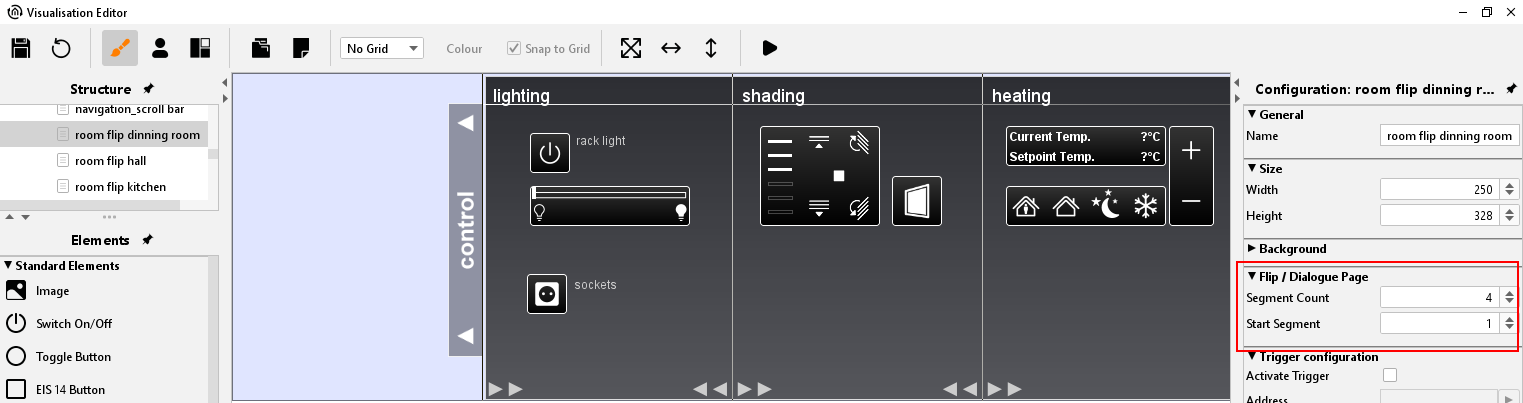
On the right side, you can see the specific configuration. The page consists of 4 segments, whereas the first page works as a start page (numbered consecutively from left to right).
On the second figure you can see then, how this page was integrated in visualisation by means of the embedded page (flip)-element.
In case you don´t have any distribution project, please order it under info@bab-tec.de