

Top consumer is an element of display, which compares 4 incoming values and which list them automatically according to their amount. Thereby values will be compared by means of a horizontal bar graph. So that display is suited excellently for making visible the top consumer in a building for one view. To measure this consumption, KNX-actuators with current value detection will be applied ideally. These will deliver momentary electricity (ampere), which will convert by the integrated job to energy consumption (for example watt-hours).
CONTROL L support
The element can also be used for CONTROL L.
Specific parameter
Beside general element parameters, some specific parameters of elements exist. These parameters define which unit the top consumer will display and how many consumers will be reflected.
Bar colour:
Determines the colour of the bar, which displays the amount of consumption.
Value format:
To influence the value`s format, you can place following inputs here: Integer and fractional digits are controlled by characters “0” and “#”. “0” stands for a forcing digit, that means, even if there is no value, character “0” will be displayed. All characters, which are marked with “#”, will be optional, that means, that if there is a “0” or no value, this character will not be displayed. For example:
Value should be 0,2. In case of value format 0.0, value 0.2 will be displayed. But if you enter #.#, only digit ,2 will be shown, because there is no value (=0) on the first digit.
Data source:
At present unique selectable option “Momentary (EIB)”. That implies that information about consumption will be extract out of current EIB telegrams.
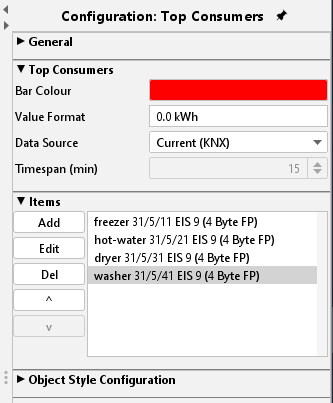
Consumer:
By this menu, particular consumer will be allocated to the element. Therefore, you will find the buttons “Append”, “Edit” and “Delete” on the side. With arrow keys, the sequence can be changed. With the help The button “Append” opens another menu:
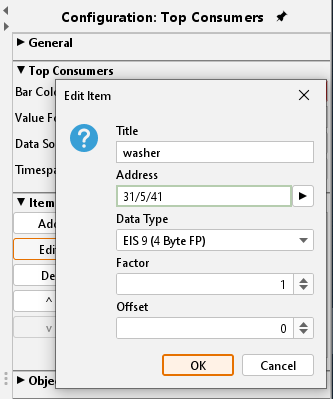
Title:
The title will be shown also in corresponding element. The name should be unique.
Address:
Input address of consumption data. This address can´t be entered by keyboard, but it must be chosen out of one ESF file. ESF-dialogue will open by pushing the arrow key near the address entry.
Data type:
The element supports following EIS types: EIS 5, EIS 6, EIS 9, EIS 10 (s + u), EIS 11 (s + u), and EIS 14 (s + u).
Factor und Offset:
Value will be multiplied with Factor and be added with Offset.
Object style configuration
All other options are described in chapter General Element Parameter.
Please note: For integrate job`s configuration please read more in chapter “Job Editor”.