

The Dimmer element serves a switch for ON/OFF and as a relative dimmer. The dimmer’s design can be adjusted using the Theme Editor. The Dimmer element can be used in mode as short press: Switching or Short press: Dimming. Therefor activate the desired version.
CONTROL L Unterstützung
Dieses Element kann auch für CONTROL L genutzt werden.
Specific parameters
Data type / outputs
The dimmer has two output objects. If it is pressed and held, relative dimming via EIS 2 data type is triggered. If it is pressed briefly, there are two options:
Pressing briefly for switching:
Switching via EIS 1 object to trigger, for example, direct switch-on or switch-off
Pressing briefly for dimming:
Absolute dimming via EIS 6 data type
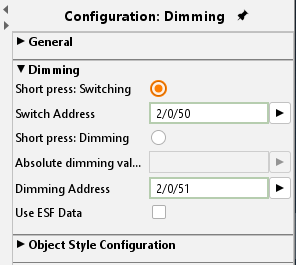
Use ESF Data
Check this box if you want to see in the visualization of the identifier used by the group address from the ETS as a tooltip.
Object style configuration
All other options are described in chapter General Element Parameter.