

The colour selection circle is used to mix colours of the RGB, RGBW or HSB colour model. Thus, the visualisation can be used to control, for example, coloured LED light fixtures via so-called "DMX" dimmers. The required values can be sent by EIBPORT in separate ways.
CONTROL L support
This element can also be used for CONTROL L.
Specific parameters
In addition to the general element parameters, there are several element-specific parameters.
Modus
First you must define the mode in which the RGB element is to be used:
-
Colour display
-
Colour control (default)
The output objects decide the group addresses to which the required values are sent.
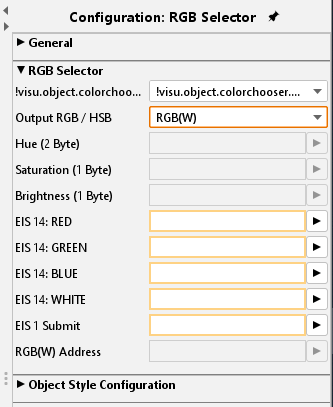
Output
Transmission of the colour values:
-
RGB(W): (EIS 14 RED/GREEN/BLUE/WHITE)
-
Via three or four EIS 14 (1 byte) communication objects for each colour channel with RGB and RGBW.
-
3 byte RGB: (DPT 232.600)
The RGB information is transmitted in a telegram. -
4 byte RGBW (EIS 11 COMBINED):
Via a communication object which combines the RGBW values in a telegram by way of EIS 11 (4 byte). -
HSB: (EIS10 HUE, EIS14 SATURATION/BRIGHTNESS)
HSB values are transmitted via an EIS 10 (2 byte) communication object for the hue and two EIS 14 (1 byte) communication objects for saturation and brightness. -
EIS 1 TRANSMISSION COMPLETED
An EIS 1 confirmation telegram is sent on this communication object after colour input has been completed. In this way the corresponding distant end is able to clearly determine that all values have been transmitted.
Object style configuration
All other options are described in chapter General Element Parameter.