

This element displays alarm messages by receiving an EIS1 telegram. The alarm messages can be acknowledged, the status colour can be changed and modalities in case of malfunctions / alarms can be defined.
CONTROL L support
The element cannot be used for CONTROL L because it cannot be displayed there.
Specific parameters
Address / Address object - Fault
The address object listens according to the defined object structure within the EIBPORT to up to 5 group addresses independent from the data type format.
Address / Address object - Acknowledge
Just if this object a group address is assigned to the alarm messages can be acknowledged out of the visualization.
Text
Defines the text being displayed.
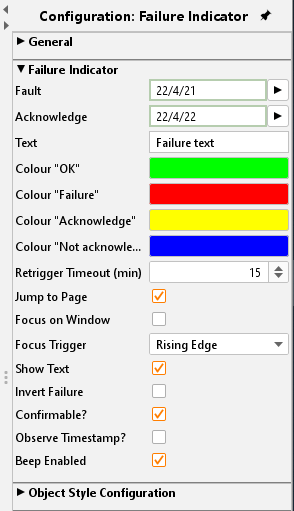
Colour “OK” / “Failure” / “Acknowledge” / “not Acknowledged”
For each status, a colour can be assigned
Jump to page
If the checkbox is activated the affected page is put into the foreground by the visualization in case of an alarm
Focus on window
If the checkbox in activated the visualization program is put into the foreground. This functionality is depending on the operation system and browser used on the client PC.
Focus trigger
Defines the trigger for focussing the visualization window:
-
ON: receiving any ON telegram
-
Rising edge: just if the object’s value changes from “0” to „1“ the focus becomes active.
Show Text
If this option is deactivated the element will be displayed without any text information but just by colour indication.
Disturbance invert
If this option is enabled, the fault is not set at "1" instead of "0".
Confirmable
If activated the element can be acknowledged by the user out of the visualization; else this can be done just by the object itself.
Observe time stamp
Compares the time stamps of acknowledge objects and alarm objects to check in case of visualization’s restart if the alarm was already acknowledged. Especially if more than one visualization client is used this function particularly useful.
Beep Enabled
If activated the visualization sends out an alert signal via PC speakers.
Object style configuration
All other options are described in chapter General Element Parameter.