

The Camera element allows to display pictures/ streams from an IP-camera. Both a freeze image and a MJPEG stream can be managed. The element can be used as icon or external window. Moreover, an event configuration is possible. For authentication purposes „http basic access“ is available.
CONTROL L Support
Not all functions are supported by CONTROL L. These functions are not supported:
-
Event mode.
-
Motion JPEG Streams.
Spezifische Parameter
Default values
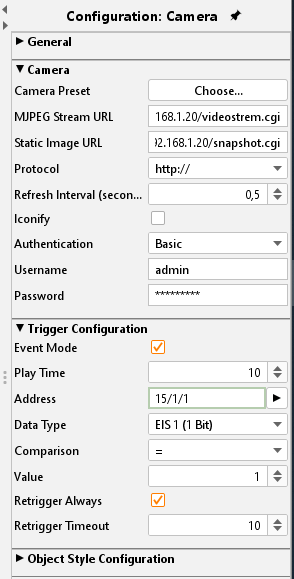
Using the selection menu, you can choose between the default settings of an Axis camera or others for your own settings.
MJPEG Stream URL
In this array the direct path to the stream has to be typed in. Many IP cameras already provide so called MJPEG Stream. It works by streaming jpeg pictures. This kind of transmission and displaying usually works fluently and with high quality. The Java visualization has an motion JPEG Decoder of ist own which is able to embed camera pictures.
URL: Static Picture
Each IP-camera has a direct path to its static picture. This static picture is the one being displayed in the moment the camera is being called. If this mode is used the camera is called several times per second – so an animated stream is built up.
Especially for Axis visualisations or in case of slow-rate internet connection this feature should be used.
Iconify
If this option is activated the camera picture will not be embedded but displayed as icon. By clicking the icon, the camera picture is displayed in a new window.
Authentication
If the camera is secured by the “http – basic_Access“ method, the access data can be entered in here. The element, thereby changing their appearance. If the camera uses another method, it must be deactivated!
User Name / Password
Type in the requested information
Event mode
It is possible to display the camera picture/stream triggered by an KNX event (alarm, switching etc)
Play time
Defines the duration of rendering. After expiry, the camera picture freezes.
Address / Data type
The address object listens according to the defined object structure within the EIBPORT to up to 5 group addresses with several data type formats:
-
EIS 1 (1 Bit)
-
EIS 5 (2 Byte FP)
-
EIS 6 (1 Byte)
-
EIS 9 (4 Byte FP)
-
EIS 10s (2 Byte value)
-
EIS 10u (2 Byte unsigned value)
-
EIS 11s (4 Byte value)
-
EIS 11u (4 Byte unsigned value)
-
EIS 14s (1 Byte signed)
-
EIS 14u (1 Byte unsigned)
Comparison / Value
The value of the object input is routed automatically to a comparator and is compared with a fixed value. The following comparative operators are available:
-
At each alteration “*”
-
Equal to “=”
-
Less than “<”
-
larger than”>”
-
less than or equal “<=”
-
larger than or equal “>=”
-
Unequal to “<>“
Retrigger always
If activated the event is triggered by each result sent out by the comparator. If deactivated just in case of changes an event is triggered.
Retrigger Timeout
Defines the time range (unit = sec) after which the trigger is available again.
Object style configuration
All other options are described in chapter General Element Parameter.
How to find out the correct URLs
Because there are existing different camera types and manufacturers there are also different syntaxes for the correct URL. Usually, it works like this to find out the correct URL:
-
Set the camera to the wanted modulation (MJPEG or static picture).
-
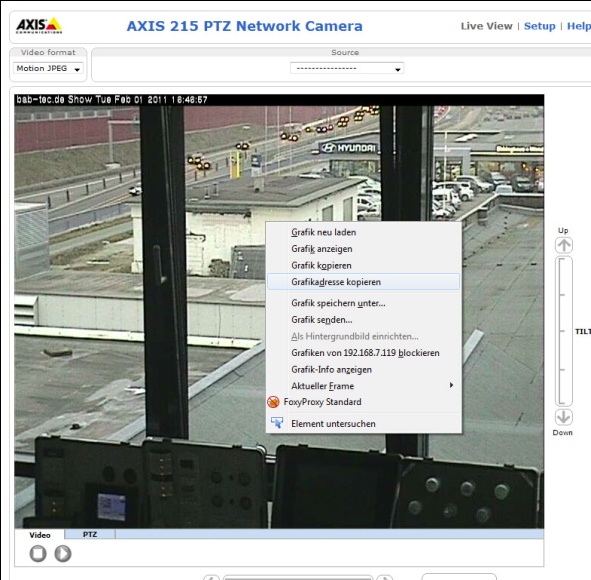
Switch to the “Live View” view on the camera’s configuration page and right- click onto the picture.
-
Select “copy file location” and insert the address in a new browser window.
-
Now you should see just the camera stream without menu bar or another element.
If this doesn’t work, please refer to the camera’s manual or the manufacturer’s webpage.
Note for external displaying / remote
So that the visualization can display the camera images or stream, the cameras must also be in the same network. For external access, the cameras must also be released or integrated via VPN or HOOC in the required network.