

RTR display serves for room temperature control. In this process, switch offers the functions standby / comfort / night reduction and frost protection. This element can be operated with EIS 1 or EIS 14.
CONTROL L support
The element can also be used for CONTROL L.
Specific parameter
Beside general element parameters, some specific parameters of elements exist. These parameters define, which data type and which address RTR-display will use.
Type EIS 14 / EIS 1:
Fundamental RTR-display can be used with EIS 14 or EIS 1 values. Depending on which data type is chosen, one or the other display will be activated.
Status Address:
If EIS 14 as data type is chosen, address data must be entered here. This could happen either by hand or by the dialogue for address input, which offers the access to data of ETS (see also: upload ESF-file)
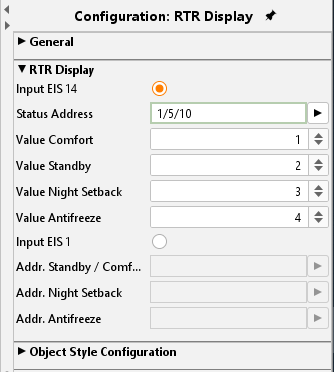
Value Standby/comfort/night reduction/frost protection:
for every status, you have to enter necessary EIS14 values in the corresponding input fields.
Adr. Standby/comfort:
If EIS 1 is defined for data type, so it will be switched between standby and comfort by this communication object.
Adr. Night reduction:
By the help of this address, it will be switched to night reduction.
Adr. Frost protection:
By the help of this address, it will be switched to frost protection.
Object style configuration
All other options are described in chapter General Element Parameter.