
Weather Station
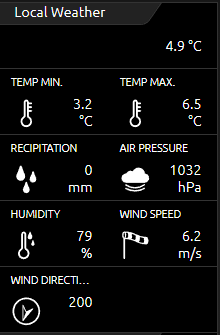
The Weather Station control element is used to display KNX measured values from an existing weather station in the CUBEVISION. These stations can be a KNX weather station, individual sensors, integrated KNX values e.g., from Smart Home Apps of your CUBEVISIONMODULE X or read-in values via a logic group of the LOGIKMODULE or LOGIKEDITOR.
By default, the control element shows the outdoor temperature in the first line (across the entire width of the control element). The subsequent lines are divided into two columns. Each of these fields shows an identifier, the unit of the measured value and a matching symbol next to the measured value (see figure on the right).
In addition to the temperature display, suitable types with symbols have been created for the following measured values:
-
Humidity
-
Brightness
-
Air pressure
-
Precipitation
-
Temperature
-
Value (universal)
-
Wind speed and direction
If the desired type is not included, the universal value can be used. The only difference to the other types is that this one does not show a symbol in the visualisation. In the figure at the top right, for example, the two values (H. TEMP and L. TEMP) are in the second line with the universal type.
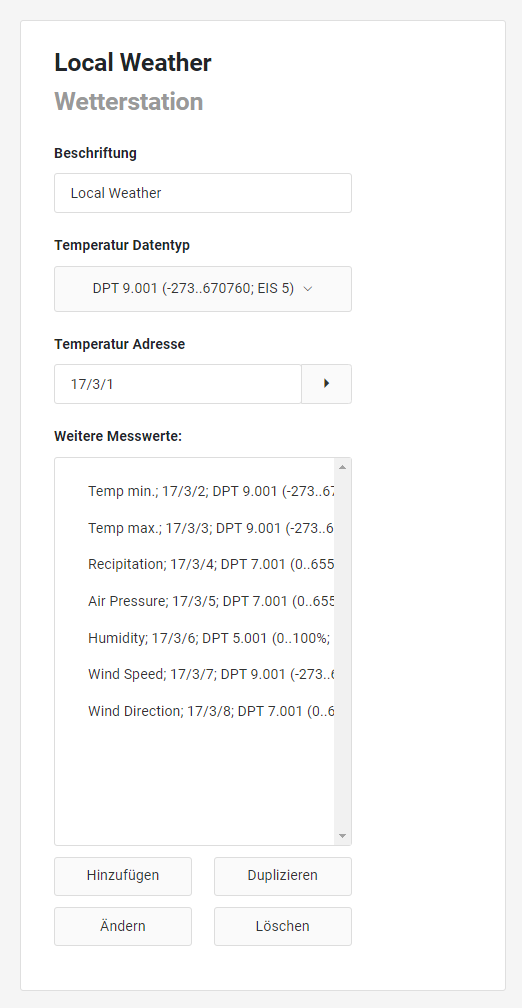
The Weather Station control element has the following configuration fields (see figure on the left):
Labelling: The label is displayed in the title bar of the element.
Temperature Data Type: The data type of the temperature is usually DPT 9.001 (EIS 5) or DPT 14 (EIS 9).
Temperature Address: The temperature is displayed in the first line of the weather display.
More Metrics: Any number of measured values can be added to this list.
The measured values are managed by Add to, Duplicate, Change and Delete.
A new window opens to configure the properties of the values.
PROPERTIES VALUE
Weather station
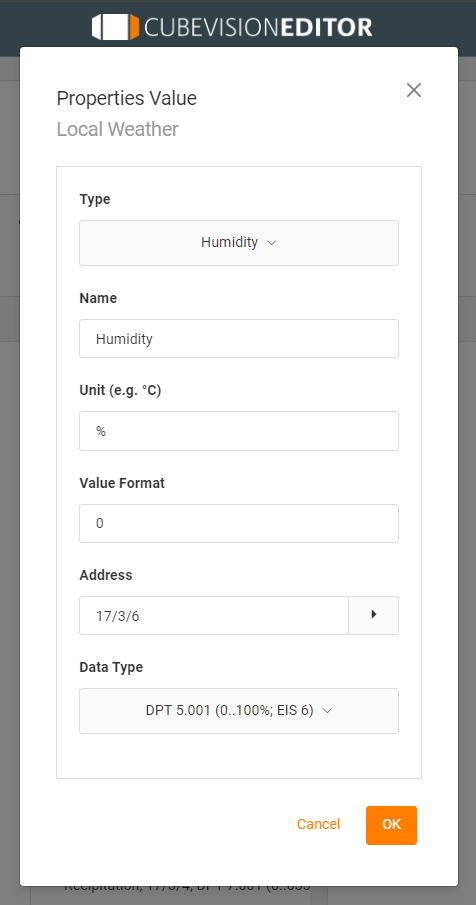
Type: The value to be displayed is selected here. In addition, a suitable icon is also displayed. For the weather control element, the six most common measured values are highlighted with an icon. These are the types: Wind speed, wind direction, brightness, air pressure, humidity, precipitation and a universal value.
If one of the types is selected, the two subsequent fields "Name" and "Unit" are filled in automatically. However, they can be changed later.
Name: Identifier for this measured value, which is placed above the measured value in the CUBEVISION visualisation.
Unit: The unit of the value (e.g. °C. mm or hPa). The unit entered here is displayed below the measured value in CUBEVISION.
Value Format: The formatting of the measured value is done in this field. The places before and after the decimal point of the value object can be defined as follows. A "0" means a fixed digit and is always displayed. A "#" is an optional digit (as usually used for decimal places) and is only displayed if required. The "." dot represents the decimal separator.
Address: The input address for the value to be received is specified here.
Data type: The data type for the value to be received is selected here. The choices are:
-
DTP 1.002 (true/false; EIS 1),
-
DTP 5.001 (0...100%; EIS 6),
-
DTP 5.010 (0...255; EIS 14u),
-
DTP 7.001 (0...65535; EIS 10u),
-
DPT 9.* (-670760...670760; EIS 5),
-
DTP9.001 (-273...670760; EIS 5),
-
DTP14.* (4-byte floating point value; EIS 9).