
For controlling RGB lighting In the CUBEVISION there is the control element Color Control RGB. RGB control is via the KNX group addresses and can thus be used for direct KNX control as well as for integrated systems (DUODMX GATEWAY, integrations via Smart Home Apps of your CUBEVISIONMODULE X or LOGIKMODULE, etc.). The Color Control also includes the options for light scenes, predefined colour settings and mixing colours freely via the visualisation.
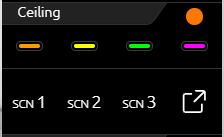
This control element has two views. A compact one with two height units, for the ICP or for the ECP, and another one in the EEV. The compact view shows a maximum of 4 freely selectable colours in the first row and a maximum of 3 buttons for scenes in the second row (see figure on the right).
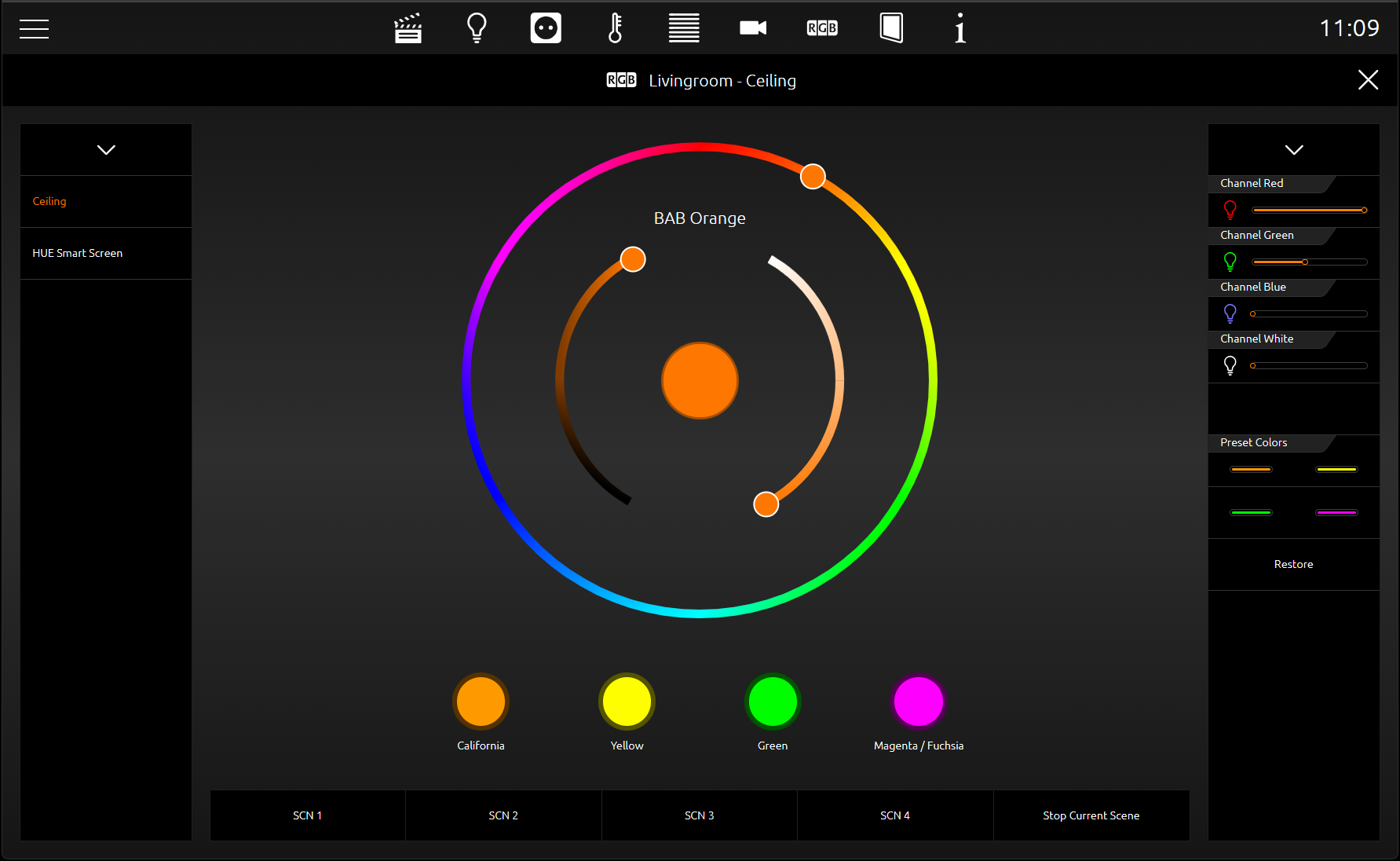
The second view shows the Color Control (RGB) element in the EEV with further control options. In addition to the selection of colours and light scenes, the EEV also uses colour channels (up to four (RGBW)) and a colour wheel.
The figure on the left shows the RGB control element in the EEV view. In the right column are the "sliders" with which individual DMX channels are controlled. If, for example, no group address is entered for the white channel of the Color Control element, it is not displayed in the visualisation. In the middle of this view is the colour circle, which is used to select the colours with a tap of the finger. Directly underneath are 2 lines with 4 buttons each for preselected colours and light scenes. In the row of light scenes there is an additional reserved button for a light scene that stops the running light scene.
To send the colour values to your RGB lamps, there are different methods depending on the RGB lamp type. They differ in that they either offer a group address for all colour values or a separate group address for each colour value.
Here are the data types:
-
Separate RGB outputs (4 *1 byte, one object each for R, G, B and W; EIS6; 0-255; for most applications).
-
Separate HSB outputs
-
WRGB output (4 bytes)
-
RGBW output (4 bytes, one object each for R, G, B and W; similar to DTP232.600 plus extra channel for white))
-
RGB output (DPT 232.600, one object for R, G and B)
This makes it possible to select the right control method for almost every RGB lamp type.
The configuration of the light scenes only consists of the assignment of group addresses. If the group address for a light scene is missing, it is not displayed in the cube. If one of the light scenes is triggered, the CUBEVISIONMODULE X sends a "1" to this group address. If you click on an active/running light scene again, the CUBEVISIONMODULE X sends the value "0" to this group address. There is room for a maximum of 4 light scenes in the RGB control element. The labelling of the light scenes is "SCENE 1" to "SCENE 4" and cannot be changed.
The "STOP SCENE" switch is located immediately to the right of the light scenes. This switch is also a light scene. It is reserved for when a lighting scene is no longer desired and simply stopping the lighting scene is not enough. For this purpose, a special light scene can be scheduled, which, for example, dims the RGB lamps until they are switched off or change to a selected colour.
In addition to the four light scene switches, there are four further switches for the favourite colours. For the configuration of the colours, it is only necessary to select the desired colour via a colour selection dialogue. So, no fiddling with colour values is necessary. The CUBEVISIONEDTIOR uses this colour from the colour selection dialogue for the visualisation. The colour values come from the colour selection dialogue and the group addresses for the colour values from the RGB control element.
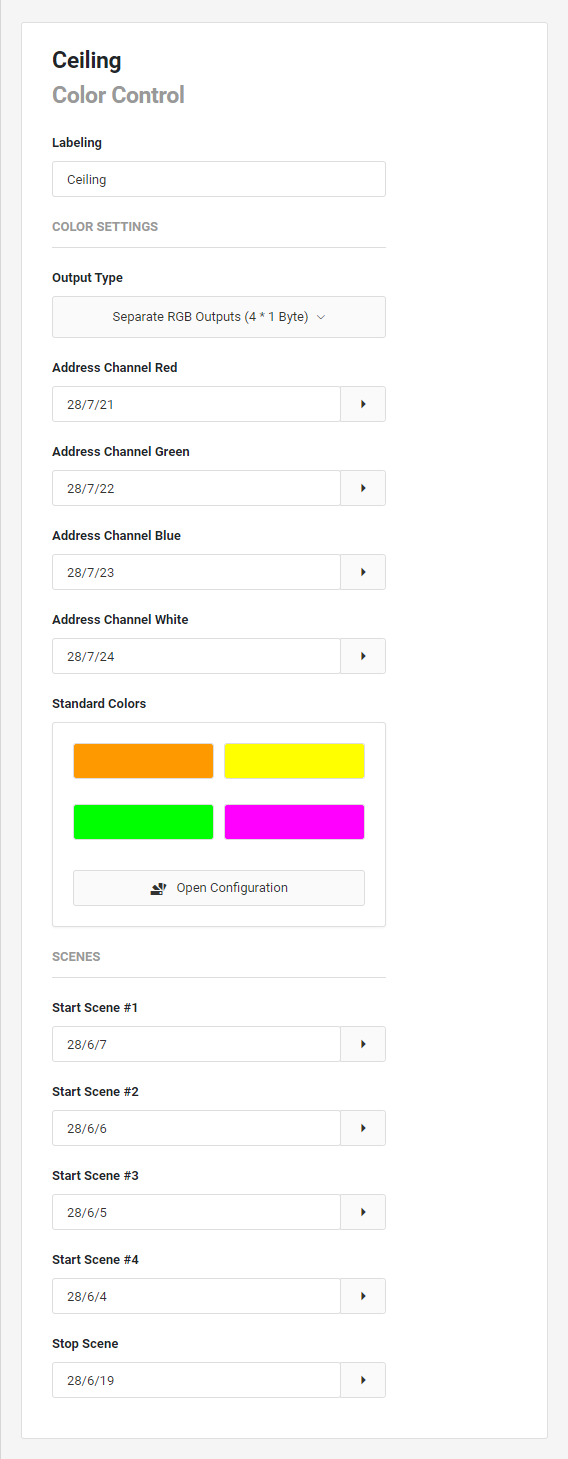
This control element has the following configuration fields (see figure on the left):
Labelling:
The Label is displayed in the title bar of the element.
COLOUR SETTINGS
Output Type: This option can be used to define the type of output. The following output types can be selected via the pull-down menu:
-
Separate RGB outputs (4 *1 byte)
-
Separate HSB outputs
-
WRGB output (4 bytes)
-
RGBW output (4 bytes)
-
RGB output (DPT 232.600)
The further configuration of the control element is done according to the selected output type. Example: Separate RGB outputs.
Address channel red: The address for the channel red (0-255).
Address channel green: The address for the channel green (0-255).
Address channel blue: The address for the channel blue (0-255).
Address channel white: The address for the channel white (0-255).
Standard colours: This is where location colours can be stored; these colours can then be selected in the element with a click.
Scenes
(can start scenes on the DUODMX gateway, for example)
Start scene #1: The address to start scene 1
Start scene #2: The address to start scene 2
Start scene #3: The address to start scene 3
Start scene #4: The address to start scene 4
Stop scene: The address to pause the current scene
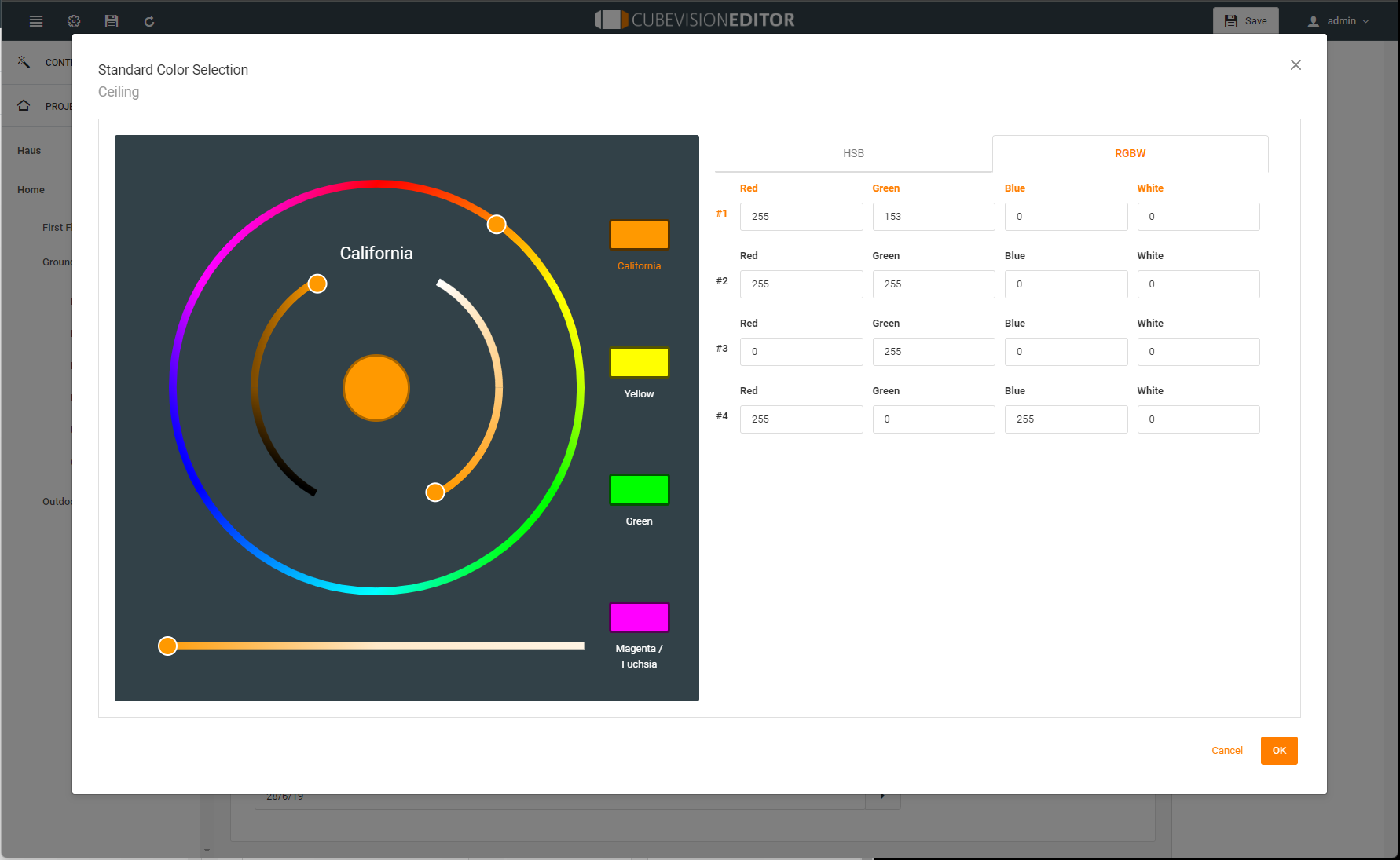
In the Standard color selection submenu, you can enter the values for your stand colors up to 4 favorites directly as a value, either as HSB values or in RGBW values. You can also use a picker to define your values via the color setting circles and move the result circle to one of the 4 favorite circles.
The RGB display element in the CUBEVISION 2+ visualization contains the pre-configured standard colors. These can be overwritten in the visualization, but can be reset by "Restore". The display element also contains the color adjustment circle and circle brightness dimmer, the color favorites buttons and scene selection. The additional menu also contains the RGBW color dimmer, standard color selection.