
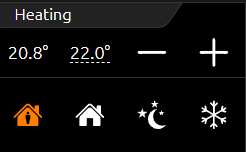
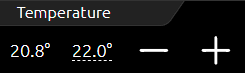
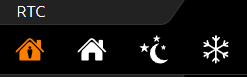
The temperature/RTR control element controls the heating control in the CUBEVISION. This control element thus offers the option of displaying the ACTUAL temperature, operating mode, adjusting the SET temperature value or the operating mode. Of the two temperature values displayed in the first line (see illustration on the right "Element RTR/Temperature" and "Element RTR"), the left-hand value is the ACTUAL temperature and the right-hand value is the SET temperature.
The SET value is adjusted using the PLUS and MINUS symbols. If this control element is configured as an extension, the PLUS and MINUS symbols are used to change the basic SET value.
In addition, the ACTUAL temperature value also indicates whether heating or cooling is currently taking place. The two states are differentiated by the colors orange and blue. Blue means cooling, orange means heating. If the temperature is displayed in white, neither mode is active or the display has not been configured.
Another feature is the control of the operating modes. These are comfort, standby, night setback and frost protection. Switching can be done either via three different group addresses or via one group address with four different values.
Three different views are available for this control element:
-
Temperature and RTR display (see figure above right).
-
Temperature display (see figure above right) and
-
RTR display (see figure above right)
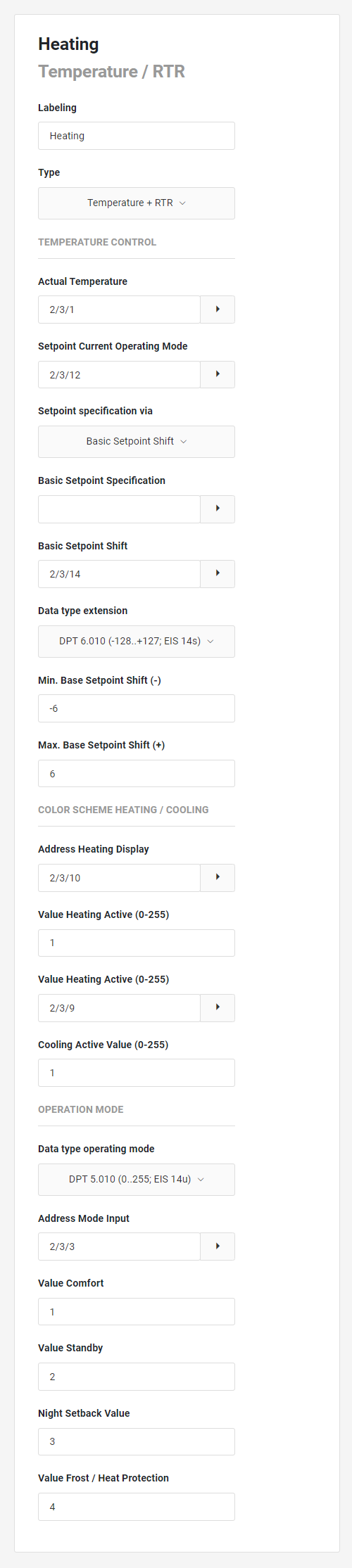
The Temperature / RTR control element has the following configuration fields (see figure on the left):
Labelling: The label is displayed in the title bar of the element.
Type: The function range of the element is defined here.
The temperature option consists of an actual and setpoint display, as well as two buttons to adjust the setpoint.
The RTR option allows the operating mode to be changed (comfort, standby, night setback, frost protection).
The following settings can be selected:
-
Temperature + RTR
-
Temperature
-
RTR (RTC)
TEMPERATURE CONTROL
Actual Temperature: The address of the actual temperature.
Setpoint Current Operating Mode: The address of the setpoint temperature is used for displaying as well as for sending a new setpoint temperature, provided the element is not configured as an extension.
Setpoint specification via: The address of the RTR via which the setpoint temperature is to be set.
Basic Setpoint Specification: The address for the base setpoint preset of the RTR.
Basic Setpoint Shift: This address is used to change the base setpoint in the step size stored in the RTC. The data type is DPT 6.010 or EIS 14 with sign.
Data type extension: Usually, the basic setpoint shift is set via a 1-byte value. However, if another data type is desired, DPT 9.001 (EIS 5) can be selected as an alternative. Setting options:
-
DPT 6.010 (-128...+127; EIS 14s),
-
DPT 9.001 (-273...670760; EIS 9).
Min. base Setpoint Shift (-): This value defines the maximum negative base setpoint shift. For example, if a value of -6 is entered here and the configured step width in the RTR is 0.5°K, this results in a possible setpoint shift of up to -3°K.
Max. Base Setpoint Shift (+): This value defines the maximum positive base setpoint shift. For example, if a value of 6 is entered here and the configured step width in the RTR is 0.5°K, this results in a possible setpoint shift of up to +3°K.
COLOR SCHEME HEATING / COOLING
Address Heating Display: In addition to displaying the temperatures, this element can display the current status for heating (orange) and cooling (blue) via the colour of the set temperature. This address is for displaying the heating status.
Value Heating Active (0-255): When this value is received on the address for heating, the heating active status is displayed.
Address Cooling Display: In addition to displaying the temperatures, this element can display the current status for heating (orange) and cooling (blue) via the colour of the set temperature. This address is for displaying the cooling status.
Cooling Active Value (0-255): When this value is received on the address for cooling, the cooling active status is displayed.
OPERATING MODE
Data type operating mode: The data type can be changed alternatively to DPT 5.010 (0-255; EIS 14) to DPT 1.001 (ON/OFF; EIS 1). The following setting options:
-
DPT 1.001 (on/off; EIS 1),
-
DPT 5.010 (0..255; EIS 14u).
Address Mode Input: The address for selecting the operating mode DPT 5.010 (0-255; EIS 14).
Value Comfort: The value that is sent for the "Comfort" mode.
Value Standby: The value sent for the "Standby" mode.
Night Setback Value: The value that is sent for the "Night setback" mode.
Value Frost/Heat Protection: The value that is sent for the "Frost/heat protection" mode.