
DMX Groups allow multiple DMX channels to be edited simultaneously. A total of 16 groups are available, and any DMX channels can be assigned to each group.
Creating or Editing DMX Groups
To create or edit DMX groups, open the following menu in the DMX Configurator:
"Settings" → "Application Settings" → "Groups"
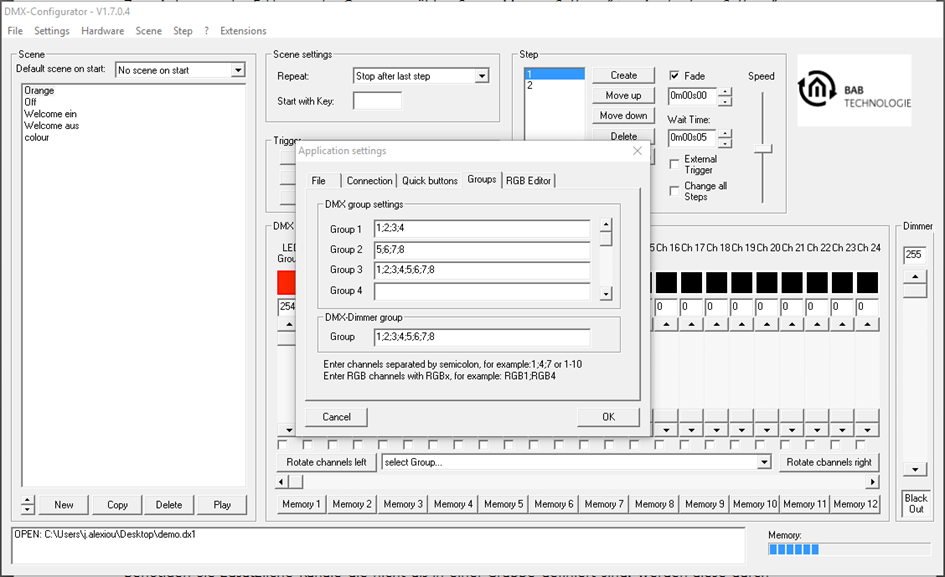
For each group, enter the desired DMX channels in the corresponding input field.
Please note the following:
-
Individual DMX channels must be separated by a semicolon (;).
-
A DMX channel can belong to multiple groups.
Using DMX Groups
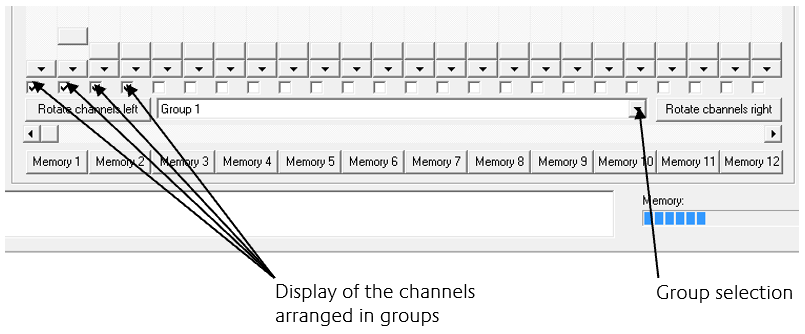
Once the groups have been created, they are available in the Group Selection list.
When a group is selected:
-
all assigned DMX channels are automatically marked with checkboxes,
-
the selected channels are linked together, and
-
changing one channel slider updates the value of all linked channels simultaneously.
Additional DMX channels that are not part of a group can be temporarily added by manually selecting their corresponding checkboxes.
///