
The Device Management function allows individual DMX channels to be grouped into logical devices.
To open the Device Management window, select:
"Settings" → "Device Management"
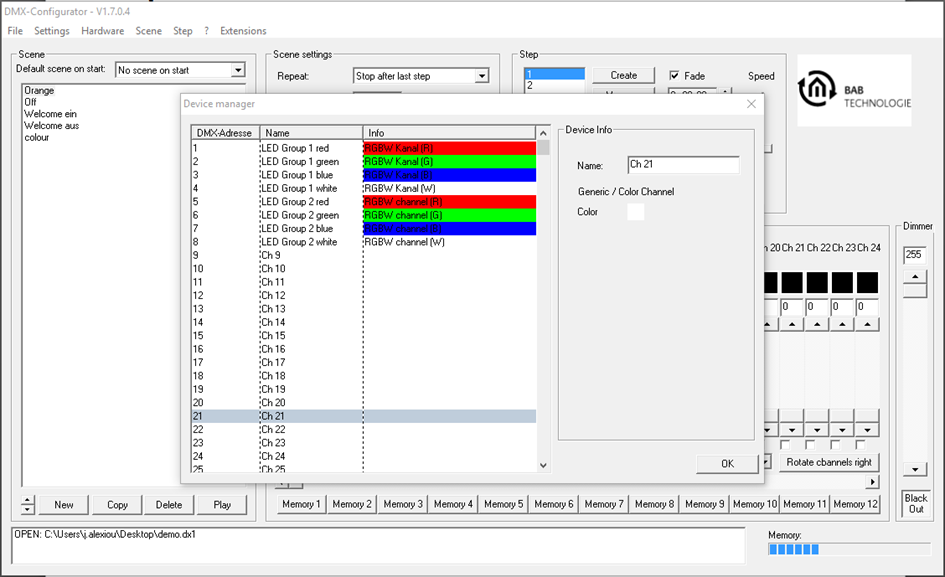
All DMX channels (addresses 1–512) are listed individually in the left pane.
When a channel is selected, the following properties can be configured in the right pane:
-
Device name
-
Device color
Creating an RGB Device
Proceed as follows:
-
Select the first channel of the desired DMX device (e.g. Ch1).
-
Enter the desired device name (e.g. "RGB Light 1") in the "Name" field.
-
Right-click the selected channel.
-
Select "Add RGB Channels".
The Device Management automatically adds the corresponding RGB channels.
The RGB device is now created and receives the name assigned to the first channel.
Creating an RGBW Device
The procedure is identical to creating an RGB device.
Instead, select the following option from the context menu:
"Add RGBW Channels"
The Device Management automatically adds the corresponding RGBW channels.
Note
The number of device names available in the Device Management is limited.
-
A maximum of 225 device names can be created.
-
Each device name may contain up to 15 characters.
The 15-character limit exists because the DUODMX APP displays a maximum of 15 characters per DMX channel.
Longer names are truncated in the app and reduce the maximum number of device names that can be stored.
///