
When used together with the DUODMX GATEWAY, the DMX Configurator provides a DMX Preview function. Any changes made to the DMX channel controls are transmitted immediately to the connected DMX devices.
This allows lighting sequences and scenes to be tested and adjusted without first transferring the configuration to the device.
Note
While the DMX Preview is enabled and the DMX Configurator is running, DMX values are transmitted continuously.
During this time, simultaneous control via KNX TP or KNXnet/IP is not possible, as the preview data overrides incoming control commands.
Therefore, use either the DMX Preview or the respective control system.
Preview Modes
The preview function supports two operating modes.
Broadcast Preview
In Broadcast Preview mode, preview data is sent to all DUODMX** GATEWAY devices** available on the network, regardless of their network settings or whether they are in the same IP subnet as the PC.
The preview data is transmitted as a broadcast.
Unicast Preview
In Unicast Preview mode, the preview data is sent only to the selected DUODMX** GATEWAY**.
For this mode, both the PC and the selected gateway must be located in the same IP subnet. The preview data is transmitted as a unicast to the configured IP address.
Selecting the DMX Outputs
Regardless of the selected preview mode, you can choose which of the two DMX outputs will receive the preview data.
The options DMX-Out 1 and DMX-Out 2 correspond to the two DMX interfaces of the DUODMX GATEWAY.
To enable the preview function, open the following menu in the DMX Configurator:
Extensions → DUO-DMX Gateway
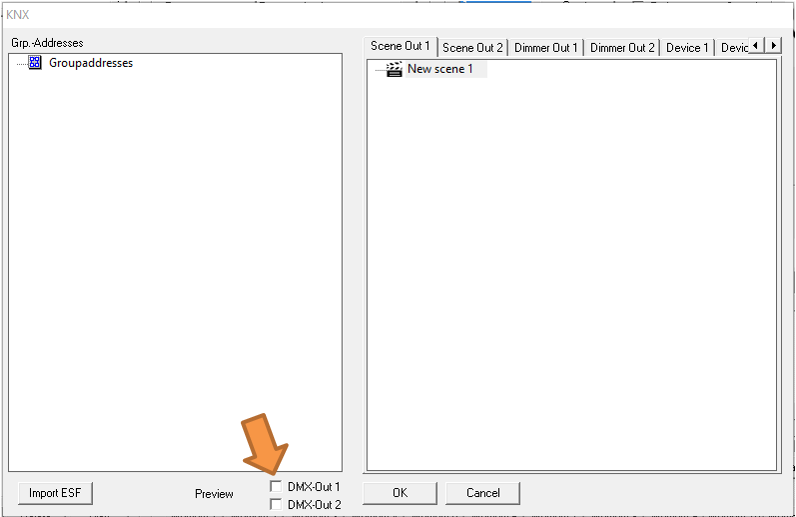
Enabling Broadcast Preview
-
Enable DMX-Out 1, DMX-Out 2, or both.
-
Confirm the selection by clicking OK.
The preview data will then be broadcast to all available DUODMX GATEWAY devices on the network.
Enabling Unicast Preview
-
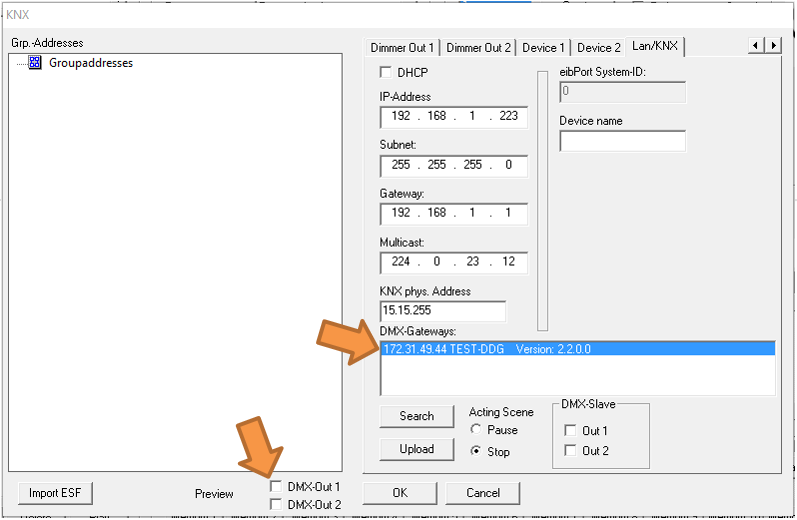
Open Extensions → DUO-DMX Gateway.
-
Click Search.
-
Select the desired gateway from the DMX Gateways list.
-
Enable the preview for DMX-Out 1, DMX-Out 2, or both.
The preview data will now be transmitted only to the selected DUODMX GATEWAY.
Note
The preview function is not a device setting. It is neither transferred to the DUODMX GATEWAY nor stored in the DMX Configurator project file.
The setting applies only to the currently running instance of the DMX Configurator and must be enabled again after restarting the software, if required.
///