
When DMX channels are switched on or off via the 1-bit object, the dimming value is normally set directly to 100%or 0% without any intermediate steps.
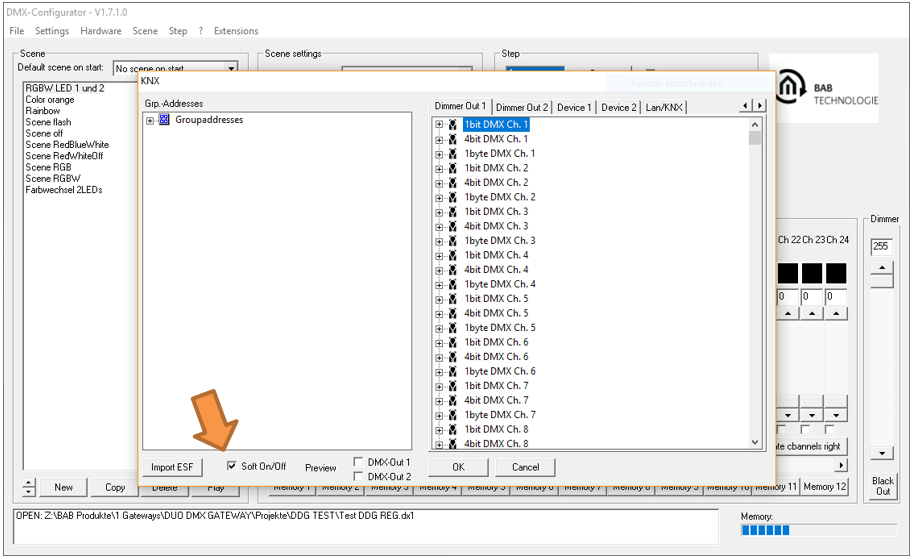
The Soft On / Soft Off function enables smooth dimming for the first 128 DMX channels, providing a gradual transition when switching the channels on or off.
Operation
When Soft On / Soft Off is enabled:
-
DMX channels 1 to 128 are faded from 0% to 100% or from 100% to 0% over a period of 5.2 seconds.
-
The fade time is reduced proportionally if the dimming process starts above 0% or ends below 100%.
Example
If a channel is switched off while its current dimming level is 50%, the fade-out time is reduced to 2.6 seconds.
Activation
The function is enabled or disabled for both DMX interfaces simultaneously in the Extensions menu.
After the project has been uploaded, the function becomes active. DMX channels 1 to 128 are then switched on and off via the 1-bit object using a fade time of 5.2 seconds.
Note
The Soft On / Soft Off function only operates when using the 1-bit object.
If a DMX channel receives a new dimming value via the 1-byte object while a fade operation is in progress, the current fade is immediately cancelled and the received value is applied.
///