
Extensions Menu
The device-specific settings of the DUODMX GATEWAY are configured using the "DUO-DMX Gateway" extension in the "Extensions" menu.
The following functions are available, among others:
-
Linking KNX group addresses
-
Configuring the network settings and IP address
-
Transferring the configuration data to the DUODMX GATEWAY
-
Searching for devices on the network
-
Enabling the DMX Preview function
-
Switching between Master and Slave mode (depending on the selected device type)
The individual functions of the Extensions menu are described in detail in the following sections.
Selecting the Device Type
Before the device-specific settings of the DUODMX GATEWAY can be configured, the appropriate device type must be selected.
When opening the Extensions menu for the first time in a new project, the Device Type Selection dialog is displayed.
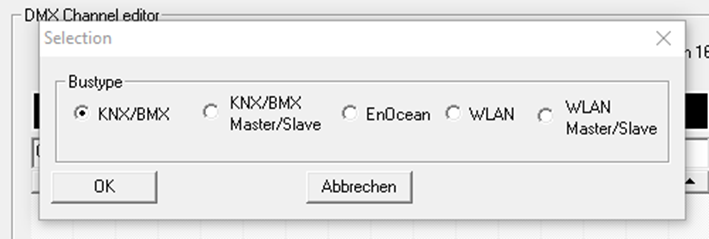
Select the appropriate device type for your application.
Device Types
|
Type |
Supported Device Variant |
|---|---|
|
KNX |
DUODMX GATEWAY KNX SR REG (Art. No. 12521) |
|
KNX Master/Slave |
DUODMX GATEWAY KNX SR REG (Art. No. 12521) |
Note
The Device Type Selection dialog is only displayed when creating a new project. Once the project has been created, the selected device type cannot be changed.
Selecting the Correct Device Type
For KNX-based projects, two device types are available:
-
KNX
-
KNX Master/Slave
The only difference between these two device types is the operating mode of the DMX interfaces.
-
KNX
Both DMX interfaces operate exclusively as DMX Masters. Incoming KNX telegrams are converted into DMX commands. -
KNX Master/Slave
In addition, each DMX interface can be configured independently as either a DMX Master (transmitting) or a DMX Slave (receiving). This allows incoming DMX data to be received and forwarded to the KNX bus.
Recommendation
If communication is required only in the direction KNX → DMX, select the "KNX" device type.
The "KNX Master/Slave" device type is only required if at least one DMX interface is to operate as a DMX Slave, allowing incoming DMX data to be converted into KNX telegrams.
///