
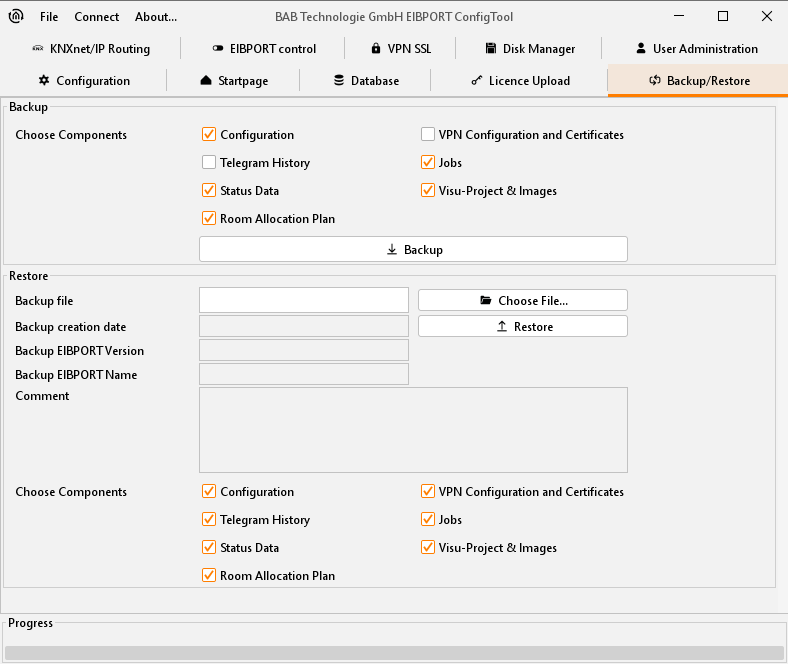
The EIBPORT has a ‘backup and restore’ function. The configuration data, as well as all job, visualisation, occupancy plan and telegram history data, can be backed up and restored later.
Backup and restore can also be performed for individual components types only.
Available components
-
Configuration
-
Telegram History
-
State Data
-
Room Allocation Plan
-
VPN configuration & Certificates
-
Jobs & Logic Groups
-
Visu-Project & Images
CUBEVISION
CUBEVISION project data cannot be saved separately, but rather is automatically backed up alongside the backup of “Visu project & images”. Individual CUBEVISION projects can be imported individually using selective project import.
Configuration
In configuration data all settings of ConfigTool are stored, but not those of connection settings of LAN (IP-address) and, if existing, those of ISDN. In case these data would be saved, it would be possible to be locked out from unit after restoring. Furthermore state- and recording table of EIBPORT will be saved by this adjustment.
Jobs & Logic groups
Job data contains only services, which will be set up in job editor. Job data will not claim much storage space, so that data saving will proceed as quickly as possible. Saved jobs will be written automatically in available folder.
Already existing jobs will be overwritten by restore.
Visu-Project & pictures
In these data all created visualisation projects will be saved. To these data belongs images and free components (switches from component builder), which are uploaded into EIBPORT.
Room Allocation Plan (CONTROL R)
Contains all data of created room allocation plan (CONTROL R) projects. It stores the built plan and the generated data from that. EIBPORT could only generate data out of the created plan, if it has a valid licence for that (see chapter “Licence upload”). One room allocation plan (CONTROL R) project can also be saved and restored solitary. A detailed documentation about room allocation plan can be demanded under info@bab-tec.de
Telegram History
The EIBPORT has an internal table record for 500,000 telegrams. Based on these message history graphs are drawn in the visualization. Thus, the same data after a restore provide, you can be backed up. The backup is not done, can be used in the target device, the existing data in the visualization and the display is faulty.
Backup
A backup of one EIBPORT project can happen in editor and in configTool.
By editor, backup file will be applied in the home directory of used computer and the file name will contain the serial number and current date. By backup over configTool, not only filename can be freely selected, but also supplementary information will be stored. This includes the creation date of the backup, the version and name of EIBPORT. Furthermore, a comment field offers possibilities to store additional information to the backup file.
Moreover, it can be made precise distinctions by using checkboxes, which parts of the EIBPORT project should be saved (see above). The file extension of backup file is „*.epb“ (EIBPORT backup)
Please note: Back-up of a project should be performed after every modification, so you can restore last actual status in an emergency.
Restore
If desired restore file has been chosen, four check marks will display, which data the backup file contains. Is it, for example, a backup file of configuration, check marks on „jobs“, „Visu-project & pictures“ and „Room Allocation Plan“ are not set.
With a backup file, which saved more than one type of data, it can be defined by check mark, which part of backup file will be restored. So, it is possible to restore only job data out of a complete backup file. At this place, date of backup including time, the version and name of EIBPORT and the personal comment will be displayed.
Compatibility
Different EIBPORT versions are created in this manner, that a downwards compatibility is gotten. That means that projects which are created with older versions, can be uploaded to newly versions without any problems.
Exception: Units of hardware version 1. Project data of this version (up to firmware 0.3.17) can’t be loaded in newly units.
Important: Projects, which are created by newly versions can’t loaded up in older versions!