EIBPORT is able to establish a connection to a database to store information about switching operation, status and log-information.
Add Database Connection
With a right click on left column, context menu will open and a new „database connection“ can be created. Following parameters must enter in mask:
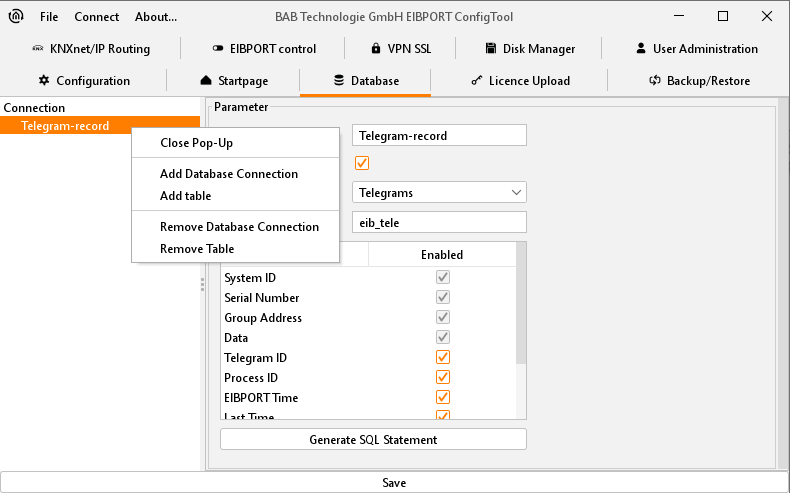
Description:
Under this name database connection in EIBPORT will be applied.
Enabled:
Activates and inactivates database connection.
DB-Type:
At the moment EIBPORT
Host:
IP-address of computer, on which the database server is installed.
Port:
Port for database communication. Standard port is 3306.
Database:
Name of database on specified database server.
Username:
The username for the database access.
Password:
The password for the database access.
Please note: User has to own the rights INSERT, DELETE, UPDATE, CREATE and DROP for administration of mySQL server.
Afterwards parameters must be saved, and database connection will be installed. To lay out spreadsheets, in which data must be written into, for every database connection required tables have to create by “Add Table” of context menu. Mask of table contain following parameters:
-
Description: Descriptive name of table.
-
Enabled: Table can be activated by this field.
-
Type: There are three types of tables, which EIBPORT can describe. Status-, telegram– and log information spreadsheet. The difference insists on kind of information, which it contains.
-
Name: Under this name, table will be applied in database.
Below it, listing will follow, describing which information will be written into database spreadsheet. If an information is not allowed, it can be disabled by a check mark.
Tabletypes
State table
This table collects actual states of EIB group addresses and their time stamps. This kind of table is necessary among others for CONTROL S (before version 0.8.5).
Telegrams
All EIB/KNX telegrams (group address, value and time) will be collected in this table.
Log Messages
In this table log information will be captured. For example, information about SMS dispatch. Recording depth of these log information can be set in ConfigTool (“System”).
|
Telegrams |
State Table |
Log Messages |
|
System ID |
Serial number |
EIBPORT time |
|
Serial number |
Group address |
Relevance |
|
Group address |
Data |
Serial number |
|
Data |
Telegram ID |
Source |
|
Telegram ID |
Process ID |
Text |
|
Process ID |
EIBPORT time |
Process ID |
|
EIBPORT time |
Initial time |
Latest time |
|
Latest time |
Latest time |
Log ID |
|
Source type |
Source type |
Repetition counter |
|
Source address |
Source address |
|
|
Routing counter |
Routing counter |
|
|
|
Update counter |
|
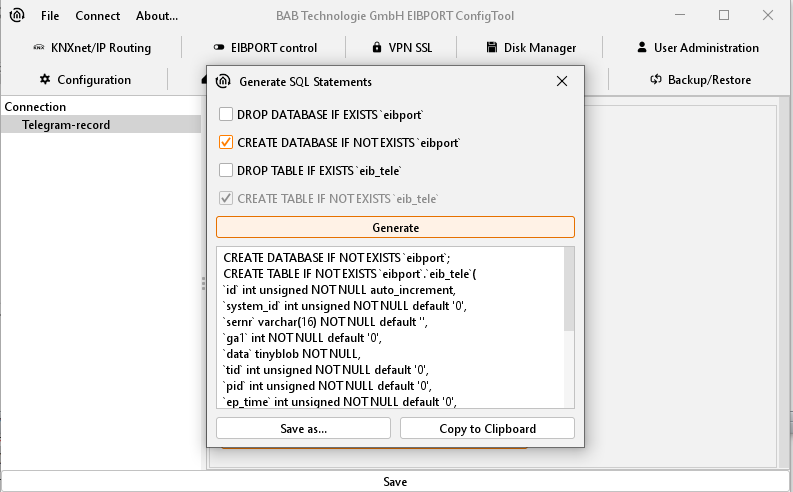
Generate SQL Statement
By switch area „Generate SQL-Statement“ according statements will be created, which induces database server to apply a database with corresponding tables. With check marks in the upper part of the window statements can be changed, in case an existing database with a similar name has to be erased.