
Once KNX group addresses are available (see the previous chapter), they can be linked to the different objects of the DUODMX GATEWAY.
The following tabs are available:
-
Scene Out – Linking configured scenes
-
Dimmer Out – Linking individual DMX channels
-
Device – Linking configured DMX devices
Contents
Linking Scenes ("Scene Out")
The "Scene Out 1" and "Scene Out 2" tabs display all scenes created in the DMX Configurator.
The following data type is used for scene control:
|
Data Type |
DPT |
Values |
|---|---|---|
|
1 Bit |
DPT 1.001 (EIS 1 Switching) |
0 / 1 |
A scene is started by sending the value "1". Sending the value "0" either stops or pauses the scene, depending on the configuration (see chapter "LAN/KNX").
Linking a Group Address to a Scene
-
Drag the desired group address from the Group Address Tree onto the corresponding scene.
-
The linked group address is displayed below the scene.
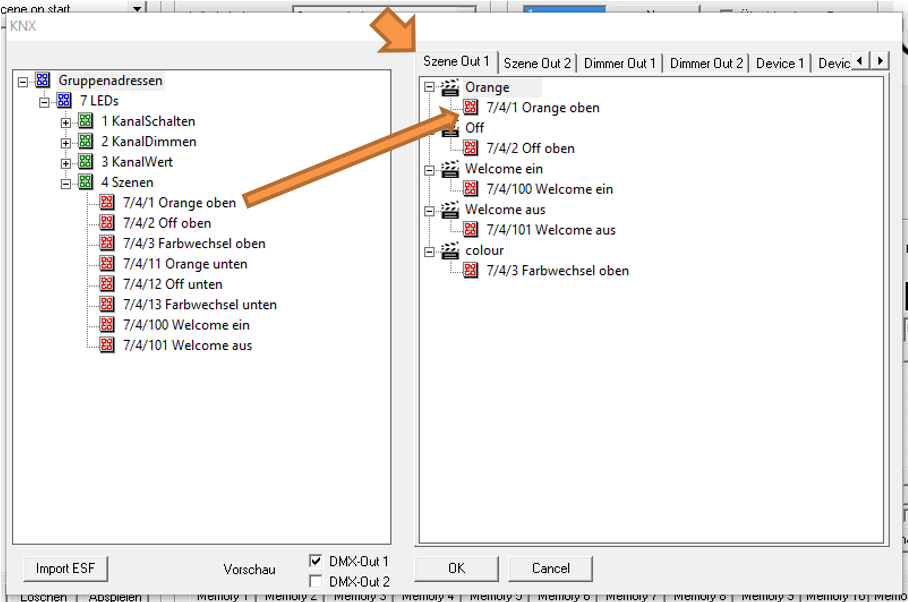
A scene can be linked to multiple group addresses.
Note
When creating a link, the DMX Configurator automatically checks whether the selected group address uses the correct data type for the communication object. If the data type is not compatible, the link cannot be created.
Linking DMX Channels ("Dimmer Out")
In addition to scenes, individual DMX channels can also be controlled directly.
Each of the 512 DMX channels is represented as an individual KNX communication object supporting the following data types:
|
Data Type |
DPT |
Values |
|
1 Bit |
DPT 1.001 (EIS 1 Switching) |
0 / 1 |
|
4 Bit |
DPT 3.007 (EIS 2 Relative Dimming) |
Brighter, Darker, Stop |
|
1 Byte |
DPT 5.001 (EIS 6 Percentage) |
0–100% (0.4% resolution) |
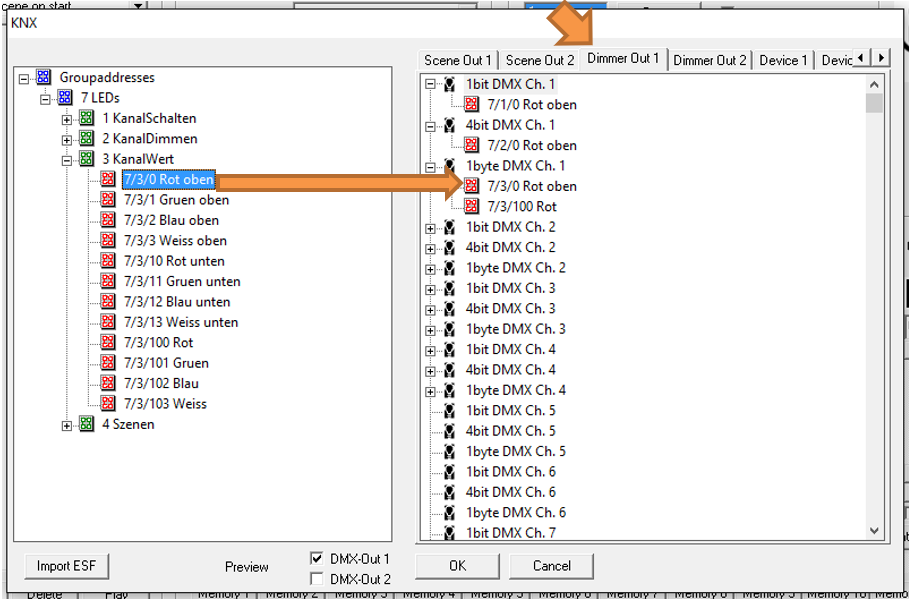
A DMX channel can be linked to multiple KNX group addresses.
The following rules apply:
-
The first group address is used for sending and receiving.
-
All additional group addresses are used for receiving only.
Linking a Group Address to a DMX Channel
-
Drag the desired group address from the Group Address Tree onto the corresponding communication object.
-
The linked group address is displayed below the object.
Linking Predefined Devices ("Device")
Besides scenes and individual DMX channels, previously configured DMX devices can also be linked to KNX group addresses.
A DMX device consists of either:
-
3 DMX channels (RGB device), or
-
4 DMX channels (RGBW device).
The following data types are supported:
|
Data Type |
DPT |
Values |
|
3 Byte |
DPT 232.600 |
RGB (Red, Green, Blue: 0–255 each) |
|
4 Byte |
DPT 12.001 |
RGBW (Byte 1 = Red, Byte 2 = Green, Byte 3 = Blue, Byte 4 = White) |
DMX devices are created as described in the chapter "Device Management".
Once defined, they automatically appear in the following tabs:
-
Device 1 (DMX Out 1)
-
Device 2 (DMX Out 2)
Linking a Group Address to a Device
-
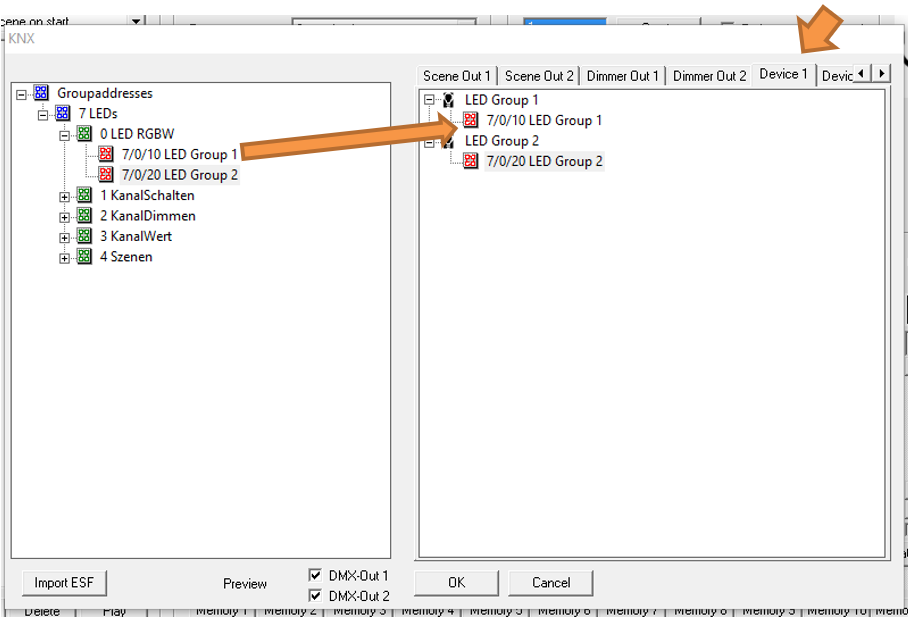
Drag the desired group address from the Group Address Tree onto the corresponding device.
-
The linked group address is displayed below the device.
Note
When linking devices, the DMX Configurator automatically checks whether the selected group address uses the correct data type for the communication object. If the data types do not match, the link cannot be created.
Special Features
Memory Function
When a DMX channel is switched on using the 1-bit object, the 1-byte communication object automatically restores the last transmitted dimming value.
Example
-
Dimming value set to 50%
-
Channel switched off
-
When switched on again, the output returns to 50%
Status Feedback
The DUODMX GATEWAY provides status feedback similar to a KNX dimmer.
-
When a DMX channel is controlled using a 1-bit or 4-bit KNX telegram, the gateway transmits a 1-byte KNX telegram containing the current dimming value.
-
When a DMX channel is controlled using a 1-byte KNX telegram, the gateway transmits a 1-bit KNX telegramindicating the current switching state (On/Off).
Separate status feedback group addresses are therefore not required.
From firmware version 2.2.0.4 onwards, status values are also transmitted when a running scene is stopped. This keeps visualization systems synchronized with the current state of the DMX devices.
Note
The DMX Configurator automatically checks the data type of the selected group address whenever a DMX channel is linked. If the data type is incompatible, the link cannot be created.
DMX Channel Value Threshold
If the value of a DMX channel falls below 10% (DMX value 25), the gateway transmits a "0" on the corresponding 1-bit KNX object.
If the value rises above 10%, a "1" is transmitted on the 1-bit KNX object.
///