
For projects requiring bidirectional communication (KNX ↔ DMX), select the "KNX Master/Slave" device type.
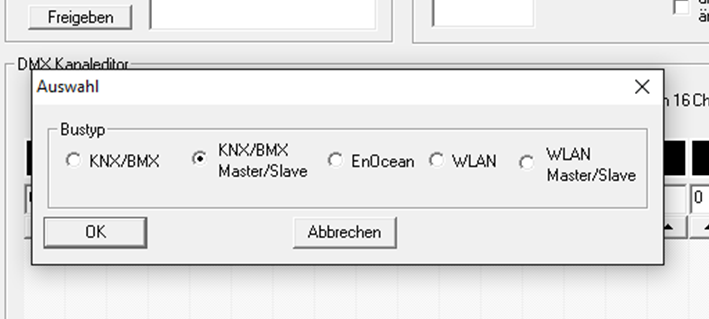
This applies to the following device variant:
-
12521 – DUODMX GATEWAY KNX SR REG
Communication (transmit/receive) via KNX Twisted Pair (TP).
The configuration window for this device variant differs only slightly from the "KNX" configuration.
Special Features of the Master/slave Function (SR)
Bei den Gerätevarianten mit der Bezeichnung “SR” kann jede der beiden DMX interfacen unabhängig voneinander entweder als DMX master (transmitting) oder als DMX slave (receiving) mode.
The operating mode is set on the „LAN/KNX“ eingestellt. Dieser Reiter steht nur zur Verfügung, if the corresponding SR-Gerätevariante ausgewählt wurde (siehe nachfolgende Figure).
Für jede DMX interface has a separate checkbox, allowing the operating mode für beide interfaces independently.
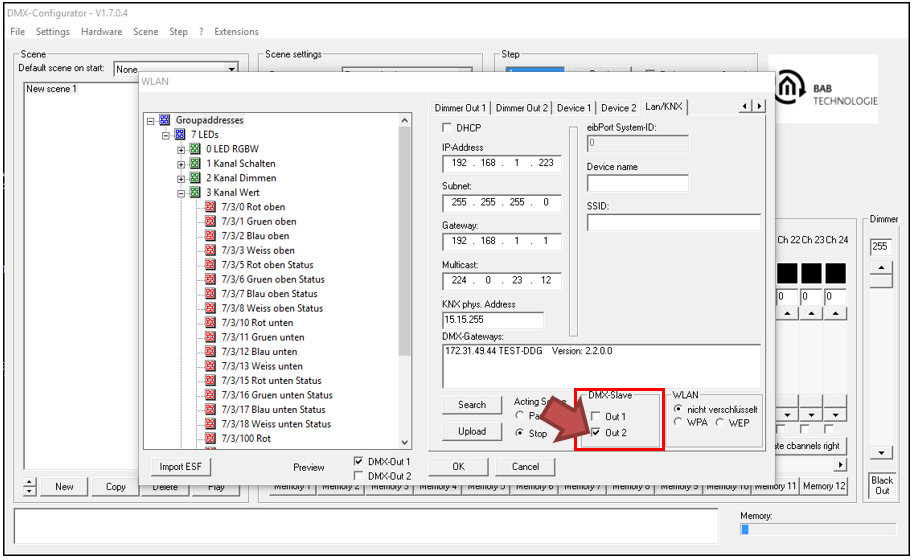
Selecting the corresponding checkbox switches the desired DMX interface to slave mode.
For example, a DMX master (such as a DMX lighting console) can be connected to this interface
In slave mode, the DUODMX GATEWAY receives DMX commands üthrough the corresponding DMX interface and forwards them as KNX telegrams.
Example
The following configuration shows how a KNX actuator üis controlled via a DMX mixing console.
-
The DMX mixing console is connected to DMX interface 2.
-
The interface „Out 2“ is configured as a slave (red arrow; Figure 42).
-
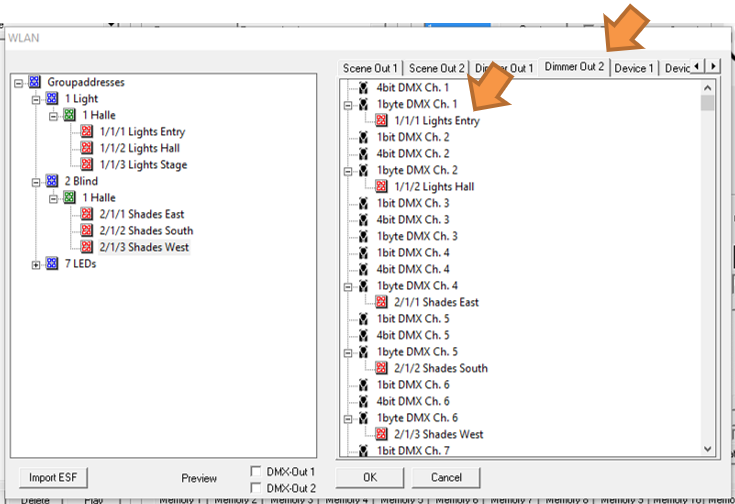
On the „Dimmer Out 2“ tab, KNX group address 1/1/1 (DPT 5.001 / EIS 6, 1 byte) is assigned to DMX channel 1 (orange arrow; following figure).
The dimming value received on DMX channel 1 (0–100%) is therefore transferred directly to KNX group address 1/1/1.1/1/1 üthrough the corresponding.
///