
After launching the BAB STARTER Software, the main menu is displayed. From here, you can search for BAB TECHNOLOGIE devices on the local network, add devices manually, and access previously used devices.
Additional functions are available for testing virtual devices, configuring application settings, and viewing software information.
Overview of Menu Items
Visited Devices
Displays a list of devices that have previously been accessed using BAB STARTER. These devices can be accessed again by selecting the corresponding entry.
This section appears once at least one device has been accessed using BAB STARTER.
Search for Devices on the Network
Starts an automatic search for compatible BAB TECHNOLOGIE devices on the local network (discovery function).
Detected devices are displayed in an overview and can be selected for further configuration or to launch their applications.
Add Devices Manually
Allows you to manually add a device using its IP address. This function can be used if a device is not found through the automatic network search.
Test Virtual Devices
Allows you to add and test virtual devices.
Settings
Opens the BAB STARTER settings, where you can adjust the available application settings.
About BAB STARTER
Displays information about the installed BAB STARTER Software, such as the current software version.
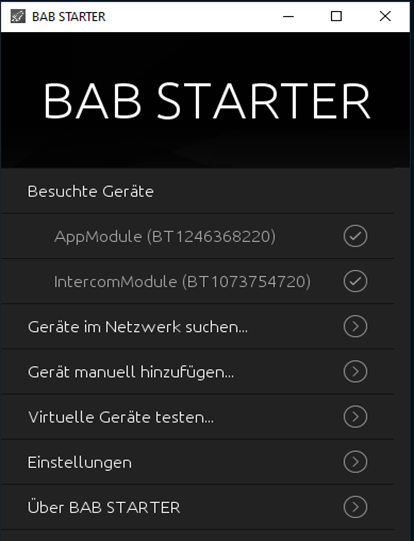
The available menu items and their appearance may vary depending on the installed BAB STARTER version.
///