
Previously accessed BAB TECHNOLOGIE devices are automatically saved in the “Visited Devices” list on the start screen. This allows you to quickly access previously used devices without having to search for them on the network or add them manually again.
When BAB STARTER is launched, the availability of saved devices is automatically checked. The current connection status of each device is displayed in the device list.
Remove Entries from the List
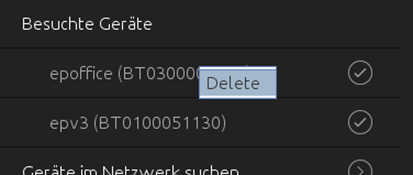
Devices that are no longer needed can be removed from the “Visited Devices” list.
-
Right-click the device entry you want to remove.
-
Select “Delete” from the context menu.
-
The selected entry will be removed from the list.
Note
Removing an entry only deletes the saved device entry in BAB STARTER. The device itself and its configuration remain unchanged. If necessary, the device can be accessed again at any time by searching the network or adding it manually.
///