
The integrated discovery function allows BAB STARTER to automatically search for compatible BAB TECHNOLOGIE devices on the local network.
The search is performed within the local network segment. Devices located in other network segments connected via routers or in virtual networks are not automatically detected.
All detected devices are displayed in the “Found Devices” overview. Each entry shows the device name and serial number. The availability of each device is also indicated by a status icon.
Device Status
Detected devices are distinguished by their current connection status:
-
Reachable (

-
Not Reachable (

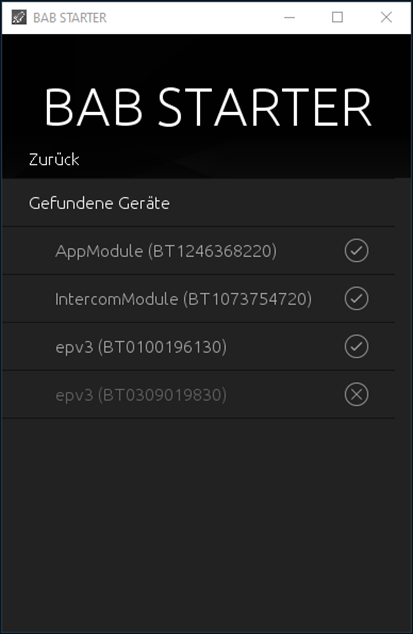
Display Device Information
Devices marked as “Not Reachable” can still be selected from the device list.
The “Details” menu item provides access to available device information, including:
-
Device name
-
Serial number
-
Installed firmware version
-
Current network configuration
Adjust Network Configuration
For supported devices, network settings can be modified directly through BAB STARTER.
This is particularly useful when a newly connected device has an IP address that does not match the existing network configuration.
If the device supports this function, its network configuration can be adjusted without having to change the computer's IP settings first.
For more information, refer to the “Change Network Settings” section.
Note on Device Names
The device name of a BAB TECHNOLOGIE device can be customized and therefore does not necessarily match the product name.
For example, an EIBPORT may appear in the device list under a custom name such as “My Home”.
The displayed serial number can also be used to uniquely identify a device.
///