
The “Add Devices Manually” function allows you to connect to BAB TECHNOLOGIE devices that were not detected during the automatic network search.
This may be necessary, for example, if a device is located in a different network segment or is accessible via a VPN connection.
Add a Device
Follow these steps to manually add a device:
-
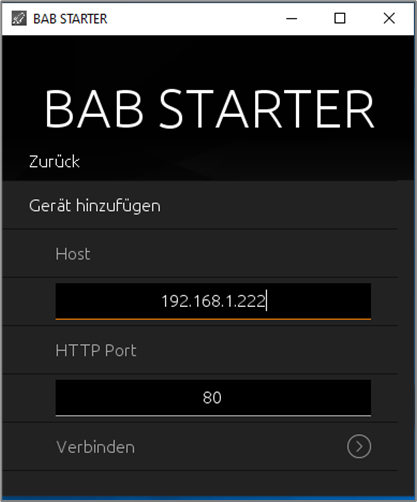
Select “Add Devices Manually” from the BAB STARTER main menu.
-
Enter the IP address or hostname of the desired device in the “Host” field.
-
Enter the corresponding port of the device in the “HTTP Port” field. Port
80is used by default. -
Click “Connect” to establish a connection to the device.
Once the connection has been successfully established, you can access the available device functions and applications.
Input Guidelines
IP Address or Hostname
Enter only the IP address or hostname of the device, for example, 192.168.1.222.
Important
Do not add a protocol prefix such as http:// or https:// before the IP address or hostname. Otherwise, the connection cannot be established.
HTTP Port
Use the HTTP port configured for the device. The default port is 80, but this may vary depending on the device configuration.
Security for External Connections
When accessing devices outside the local network, it is important to ensure a secure network connection.
We recommend connecting to external devices exclusively through a secure VPN connection. This allows access to devices in remote networks without exposing them directly to the internet.
For information on setting up and configuring a VPN connection, refer to the documentation for the respective device.
///