
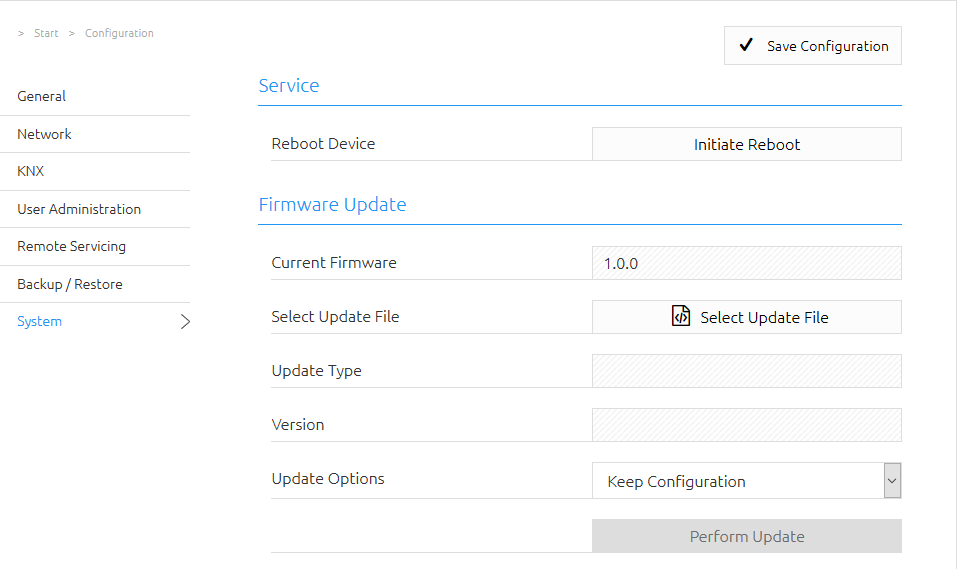
The System section provides functions for restarting the device and updating the firmware.
Service
Use Perform Reboot to restart the LOGIKMODULE.
Firmware Update
The firmware of the LOGIKMODULE can be updated via the web interface. Firmware updates are provided free of charge.
The latest firmware is available in the download section of the BAB TECHNOLOGIE website:
Important Note
Create an up-to-date backup of the LOGIKMODULE before performing any firmware update.
For more information, refer to the chapter Backing Up Settings.
Preparing the Firmware Update
-
Download the latest firmware file from the download section.
-
Extract the downloaded file to a folder of your choice.
-
Open Configuration > System in the web interface.
-
Click Select Update File and select the firmware file with the
.binextension.
After selecting the file, the detected update type and firmware version are displayed.
Selecting an Update Option
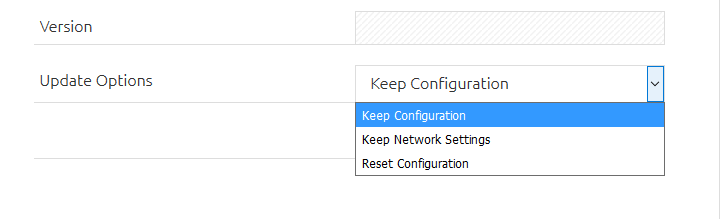
Before starting the update, select which settings should be retained after the update.
The following options are available:
-
Keep Configuration
The existing configuration settings are retained. -
Keep Network Settings
The current network settings are retained. All other configuration settings are reset.Warning
With this option, all configuration settings except the network settings are deleted.
-
Reset Configuration
The device is reset to factory settings after the firmware update.
Starting the Update
Click Start Update to begin the firmware update process.
Wait until the update has been completed.
The device restarts during the update process. After the update has been completed successfully, the web interface refreshes automatically, provided that the network connection can still be established.
Warning
Do not switch off the LOGIKMODULE or interrupt the power supply during the firmware update.
After the Update
Which settings are retained after the update depends on the update option selected beforehand.
If the configuration was reset, the previously backed-up settings can be restored afterward using a backup file.
For more information, refer to the chapter Backing Up Settings.
///