
The Remote Access menu allows the LOGIKMODULE to be used as a HOOC gateway in order to establish a secure VPN connection to the building automation system.
The integrated HOOC VPN solution provides encrypted remote access to the local network without requiring additional VPN gateway hardware.
The HOOC CONNECT E Gateway integrated into the LOGIKMODULE establishes an encrypted VPN connection to the HOOC infrastructure. This allows authorized users to securely access devices and services within the local network from outside.
The HOOC solution also provides various additional functions, for example:
-
user and access management
-
secure VPN remote access
-
KNX bus monitor
-
alarm messages with push notifications
-
additional functions for monitoring and managing remote access
Note
Using Plug & Play VPN requires a corresponding HOOC service as well as an Internet connection for the LOGIKMODULE.
For further information on setup, configuration, and use of the Plug & Play VPN solution, refer to the separate HOOC Gateway Manager documentation.
Link to the documentation
https://doc.bab-technologie.com/hgmen
Opening the HOOC Gateway Manager
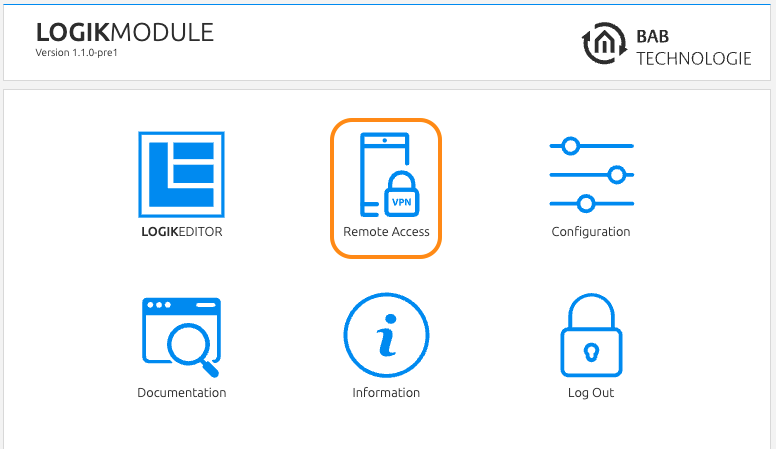
The HOOC Gateway Manager is opened from the LOGIKMODULE start page.
Proceed as follows:
-
Open the web interface of the LOGIKMODULE:
http://<IP-ADDRESS-OF-LOGIKMODULE> -
Log in to the web interface if required.
-
Select Remote Access on the start page.
The HOOC Gateway Manager then opens and can be used to configure and manage remote access.
Note
The actual configuration of the HOOC VPN connection is carried out in the HOOC Gateway Manager. For further information, refer to the separate HOOC documentation.
///