
Network
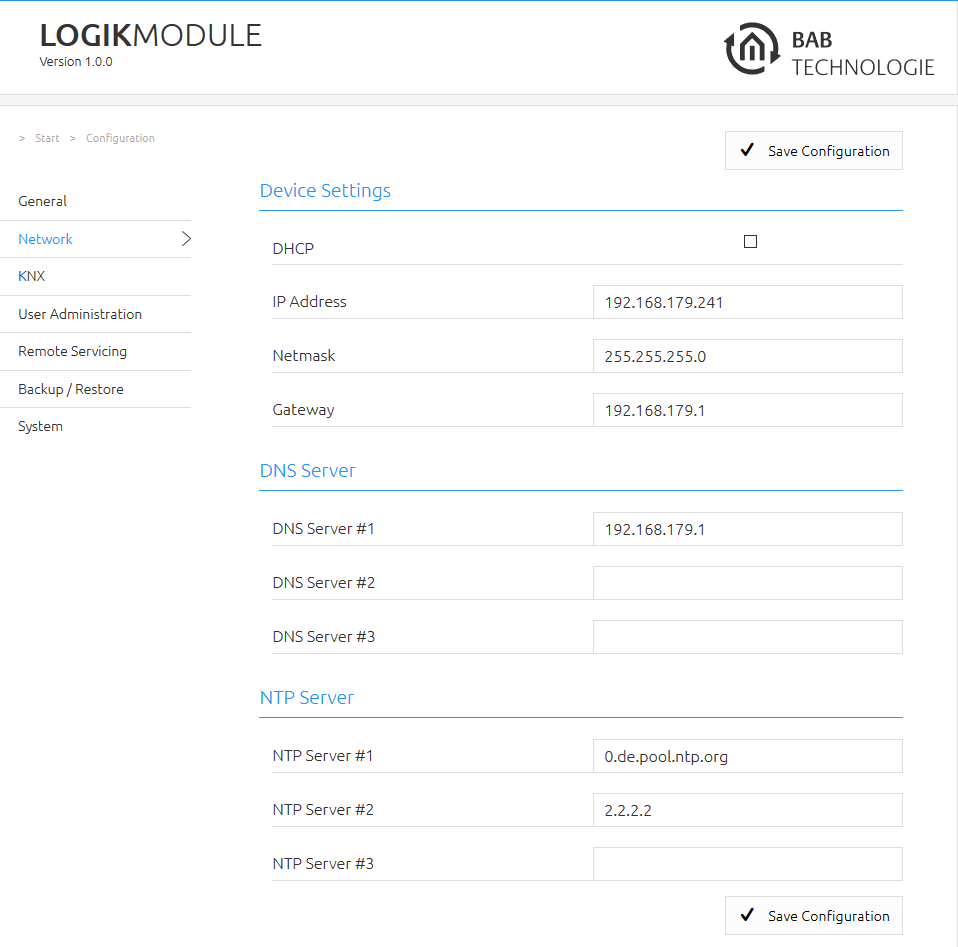
The basic network settings of the LOGIKMODULE are configured in the Network section.
|
Setting |
Description |
|---|---|
|
IP Address / Network Mask / Gateway |
If DHCP is not enabled, the network settings must be entered manually. If in doubt, ask your network administrator for the required values. Make sure that each IP address is assigned only once within the network. |
|
DNS Server |
DNS stands for Domain Name System. The DNS server translates hostnames and Internet addresses into the corresponding IP addresses and vice versa. Without a valid DNS configuration, functions that require name resolution may not be available or may only work with limitations. |
|
NTP Server |
NTP is used to synchronize the system time of the LOGIKMODULE. If no connection to an NTP server is possible, the system time must be checked and corrected manually if required. For more information, refer to the chapter General. Example of a public NTP server pool: |
Note
When using a static network configuration, the IP address, network mask, gateway, and, if required, DNS server must match the existing network structure.
///