
MQTT data points represent the individual MQTT topics of an MQTT connection. Within logic groups, they are used via the MQTT Value Input and MQTT Value Output logic elements.
A new MQTT data point is created by clicking the gray area with the plus sign (+).
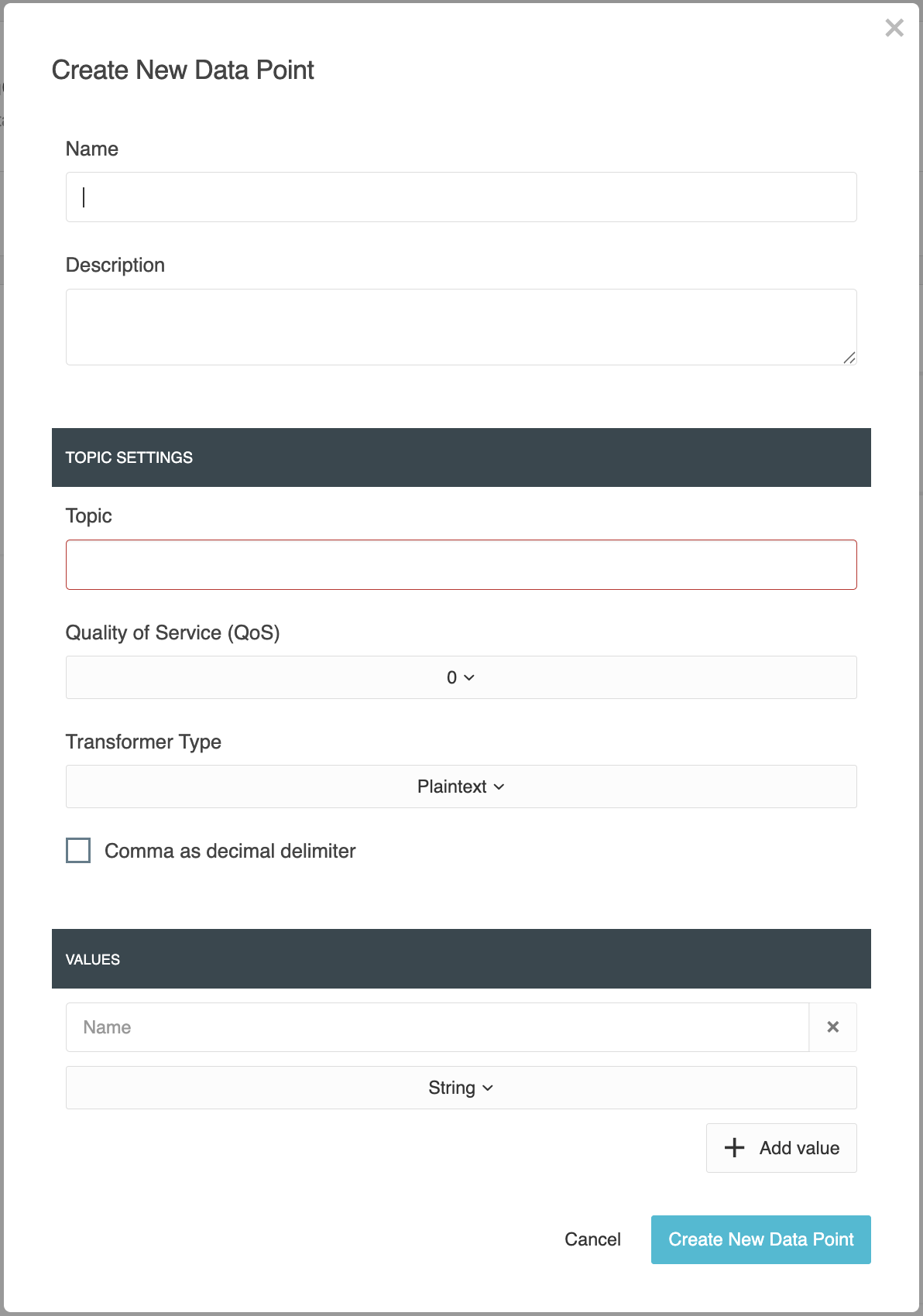
When creating a new data point, the configuration opens with the corresponding parameters.
The MQTT topic is not assigned automatically. It must be entered manually according to the topic structure of the MQTT system being used.
In addition, MQTT data points can be copied, deleted individually, or selected using multiple selection and deleted together.
Note
If an MQTT data point is used in an active logic group, certain structural properties cannot be changed.
The affected fields are disabled in the user interface and marked with a corresponding note.
This applies in particular to:
-
Name
-
Topic
-
Quality of Service (QoS)
-
Transformer Type
-
configured values
An MQTT data point can only be deleted if it is no longer used in any active online logic group.
If the data point is used only in a working copy, it can be deleted. Before deletion, the affected logic groups are indicated.
General
-
Name
Enter a unique and descriptive name for the MQTT data point.The name is used in the data point list and when selecting the data point within logic groups.
-
Description
This text field can be used to enter a more detailed description or additional information about the MQTT data point.
Topic Settings
This section is used to configure the MQTT-specific parameters of the data point.
-
Topic
Enter the MQTT topic used by the data point to receive or send messages.The topic is required and must match the topic structure of the MQTT system being used.
-
Quality of Service (QoS)
Defines the delivery guarantee for MQTT messages.-
QoS 0 – At most once
The message is sent once. No acknowledgment is returned by the broker.This level generates the lowest communication overhead but does not guarantee delivery.
-
QoS 1 – At least once
The message is retransmitted until its receipt is acknowledged.This ensures delivery, but a message may be received more than once.
-
QoS 2 – Exactly once
The message is transmitted using an extended acknowledgment procedure.This ensures that the message is delivered exactly once. This level provides the highest delivery reliability but also generates the greatest communication overhead.
-
-
Transformer Type
The transformer type determines how the MQTT payload is interpreted or generated.The following options are available:
-
Plaintext
The MQTT payload is processed as plain text.The message content is used directly as the value of the data point.
-
JSON
The MQTT payload is processed as a JSON structure.This makes it possible to read or write individual values within a JSON object.
-
-
Comma as Decimal Separator
Enables the use of a comma instead of a period as the decimal separator when processing numeric values.
Values
An MQTT data point contains at least one and a maximum of 20 values.
A new value is added via the gray area with the plus sign (+).
The names of the values must be unique within an MQTT data point and must not be empty.
The configured values determine the inputs or outputs of the corresponding logic element. If an MQTT data point contains multiple values, the corresponding number of ports is provided within the logic group.
The following settings are available for each value:
-
Name
Enter a unique name for the value.The name is used to identify the value within the MQTT data point and is displayed at the corresponding input or output of the logic element.
-
Data Type
The data type determines how the value is interpreted and processed within the LOGIKEDITOR.The following data types are available:
-
Boolean
Processes the value as a Boolean value (trueorfalse).Suitable for switching states or other binary information.
-
Float
Processes the value as a floating-point number.Suitable for measured values such as temperatures, voltages, or other continuous values.
-
Integer
Processes the value as an integer without decimal places.Suitable for counter values, status codes, or other integer values.
-
String
Processes the value as a character string.Suitable for text, labels, or other alphanumeric content.
-
///