
Modbus TCP data points read and write the individual Modbus values of a Modbus TCP device. They are used within logic groups via Modbus TCP value input and Modbus TCP value output.
A new data point is created by clicking on the grey area marked with a “plus” sign. New data points are automatically assigned the first available address for the current unit ID.
When creating new data points, a window opens in which the following parameters are specified.
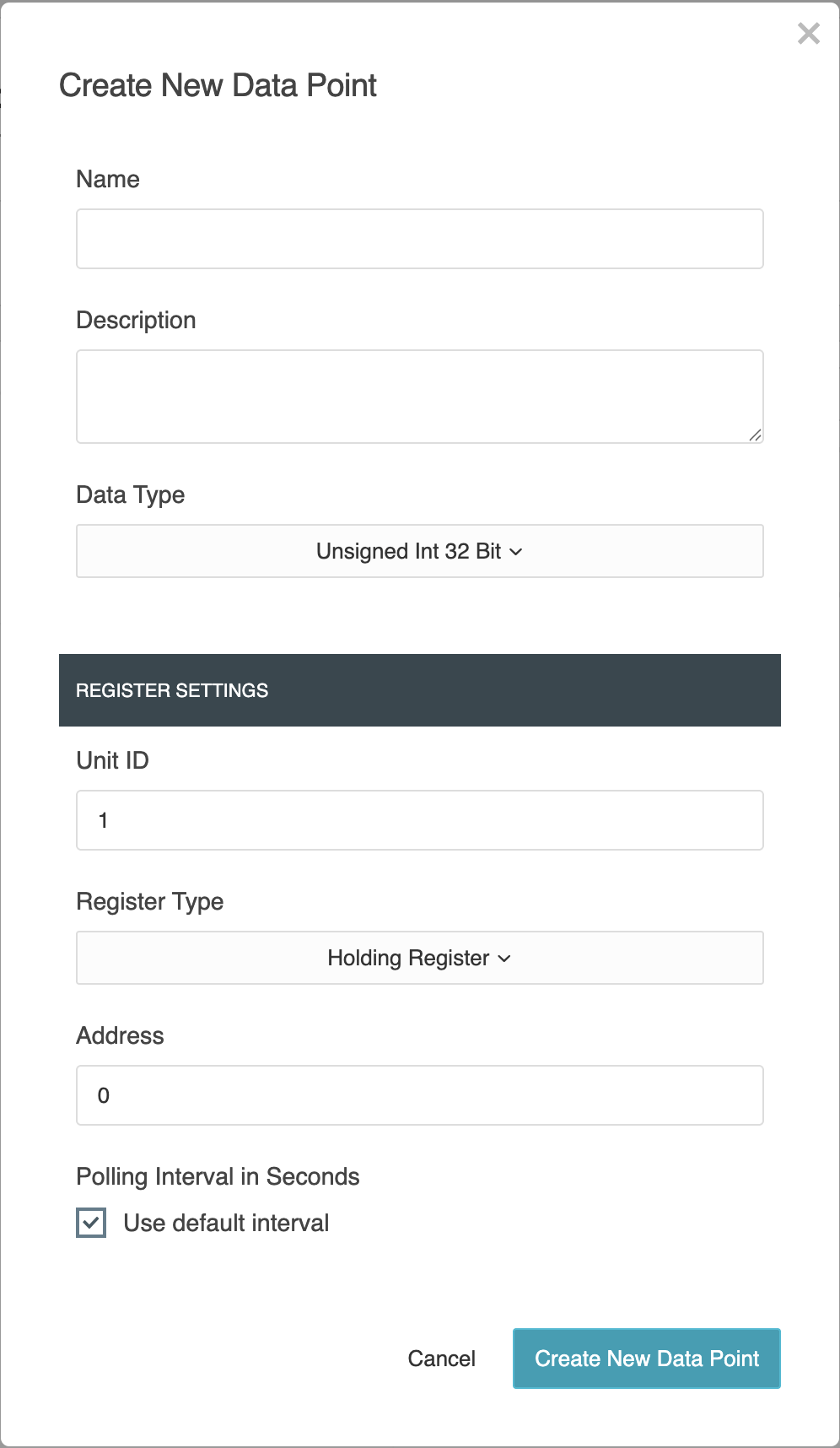
A new data point is created by clicking on the grey area marked with a “plus” sign. New data points are automatically assigned the first available address for the current unit ID.
General
-
Name:
Enter a descriptive name for the data point here -
Description:
You can enter a more detailed description or important information about the data point in this text field -
Data type:
Select the data type of the Modbus register here. The options are
Float, Integer, Unsigned Integer and String.
The selection determines how the received or sent values are interpreted.
When using the ‘String’ data type, a string length in bytes between 1 and 250 is permitted.
Register settings
In this section, you can configure the basic parameters for accessing the Modbus register.
-
Unit ID
Specifies the device address (slave ID) of the Modbus participant, which uniquely identifies the target device on the network. -
Register type
Select the type of register to be accessed (e.g. holding register, input register, coil or discrete input). This determines the type of read or write access.
For coil and discrete inputs, only the ‘Bool’ data type (1 bit) is permitted.
For holding registers and input registers, numeric data types and the ‘String’ data type are available. When using the ‘String’ data type, a size in bytes can be specified within the range of 1 to 250. -
Address
Defines the register address for this data point that is being accessed. Valid entries range from 0 to 65535.
The combination of unit ID and register address must be unique within a Modbus TCP device.
Depending on the manufacturer, the addressing may be 0-based or 1-based.
Please refer to the documentation for the Modbus device.
-
Polling interval in seconds
This option determines whether the data point uses the default polling interval of the associated Modbus TCP device.-
If the checkbox is checked, the data point automatically adopts the default polling interval configured in the Modbus TCP device.
-
If the checkbox is unchecked, a custom polling interval in seconds can be specified for the data point. This allows individual data points to be polled more or less frequently, independent of the default interval.
-
The use of custom polling intervals allows for flexible adaptation to the varying requirements of individual data points.
A lower value results in more frequent updates, but increases the bus load.
If a data point is being used in an active logic group, certain fields in the configuration are marked with a note and disabled.
In this state, changes cannot be made to locked properties such as name, data type and register type.
To edit the full configuration, the logic group using the data point must first be deactivated.
Administration
“Add”
You can create a new Modbus TCP data point by clicking on the area marked with a “+”.
“Copy”
Clicking the copy icon copies the relevant data point. It is created as a new data point with the suffix “Copy of…” in its name.
When copying an existing data point, all associated parameters are carried over. The data point’s previous address is also copied. As the same address cannot be used more than once within a Modbus TCP device, the copied data point is highlighted in red.
The data point can only be saved once a new, unique address has been assigned.
“Delete”
The bin icon is used to remove the selected data point.
Before deleting, the LOGIC EDITOR checks whether the data point is used in logic groups.
If the data point is used in an active online logic group, it cannot be deleted. If the data point is only used in a working copy, deletion is possible but will affect these logic groups.
///