
The editor is closed via the "File"> "Close" or the "X" of the window. Before the window closes the security, dialog box opens to remind you always to create a current backup of the project. In addition, at an active Internet connection can produce a statistic EIBPORT his leave.
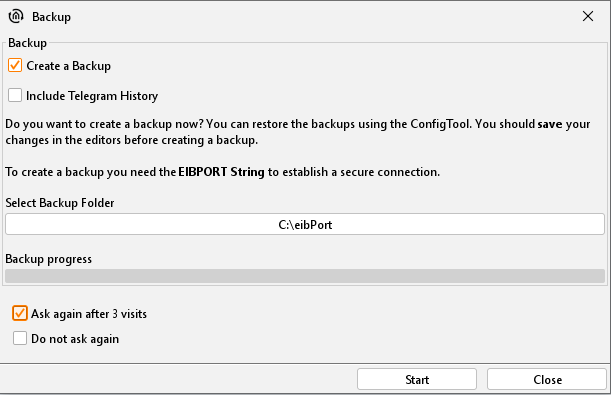
Behaviour of the window
The window always opens when the editor is closed. To prevent this behaviour, there are two check boxes in the window. "Ask again after three editor-offs" at the window, only every fourth time, you see, "Do not ask again" when the window is closing does not appear. Is it still required in this case to enter the security dialogue. This will be found in the file menu ("Open Backup dialog"). If you want to exit the editor without a backup or to create statistics click on the button "Close". If you want to return to the editor interface, you simply close the window with the "X".
Creating Backup
The EIBPORT backup file consists of all relevant data. All data of visualization, job und configuration will be stored in a file, additionally backup can be enclosed in telegram recording (SQLite data base containing 500.000 telegrams) and, in data of terminal diagrams. By preparing of a back-up, personal comments, date/time, version of EIBPORT und name of EIBPORT t are saved additionally, after version 3.0.3. A backup file has the extension "*. Epb" and the security dialog automatically creates a folder in the home directory of the client PC, the file is stored. A detailed backup for example only the visualization of data can be created under the "System" in the so-called ConfigTool.
Backup Process
To create a backup check box must be enabled. The editor automatically searches the user folder of the operating system and lay there as the name of a folder on the serial number of the EIBPORT receives (BTxxxxxxxxxx). Given to specify a different location, it is enough just to click on the field in which the path is. There are a file browser opens in which a new location can be specified. The folder is created in each case. The name of the backup file that created the dialogue following structure:
backup_[date]_[time].epb
Starting the Backup
To start the backup the "Launch" button must be used. Here is the query string EIBPORT ("EIBPORT security application"). You will find these in the short manual attached in your EIBPORT package or on the backside of the EIBPORT itself. If the backup is carried out successfully, a message appears displaying "successful backup" on the screen.