
he integrated potential-free push-button input allows predefined lighting scenes to be triggered directly using an external push button, switch, switch actuator, or key switch.
This chapter describes the electrical connection as well as the assignment of scenes to the corresponding switching states.
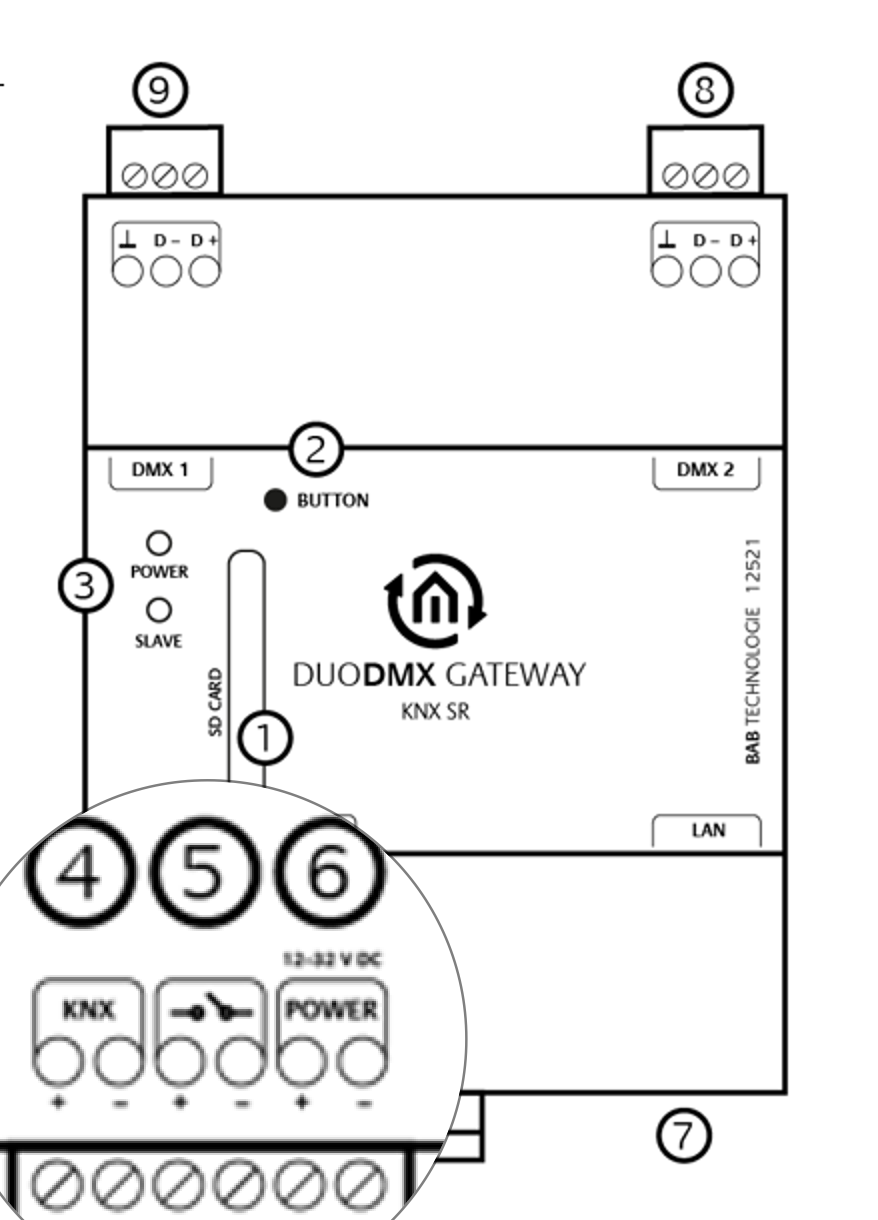
Potential-Free Input
The potential-free input can be used to manually trigger predefined lighting scenes.
For the REG version, the connection is made to pins 3 and 4 of the 6-pin pluggable screw terminal located on the side of the Ethernet connector (see Figure 5).
Depending on the switching state of the contact, the DUODMX GATEWAY automatically triggers the corresponding scene.
Contact Open
|
Scene Name |
Action |
|---|---|
|
switch_on_1 |
Play scene on DMX Interface 1 |
|
switch_on_2 |
Play scene on DMX Interface 2 |
|
switch_on_12 |
Play scene on DMX Interface 1 and 2 |
Contact Closed
|
Scene Name |
Action |
|
switch_off_1 |
Play scene on DMX Interface 1 |
|
switch_off_2 |
Play scene on DMX Interface 2 |
|
switch_off_12 |
Play scene on DMX Interface 1 and 2 |
Note
Only one lighting scene can be assigned to each switching state (Contact Open or Contact Closed).
///