General
In the General tab window, make sure UPnP is switched to be active. It may also be other UPnP devices are detected, but the full functionality cannot be guaranteed there. This option has been optimized for UPnP devices.

UPnP devices
Taken after the device through the UPnP Desktop Controller software was operating in, the device is "Select Device" on display. If the device does not exist in the list will be searched by "updating" for new devices.
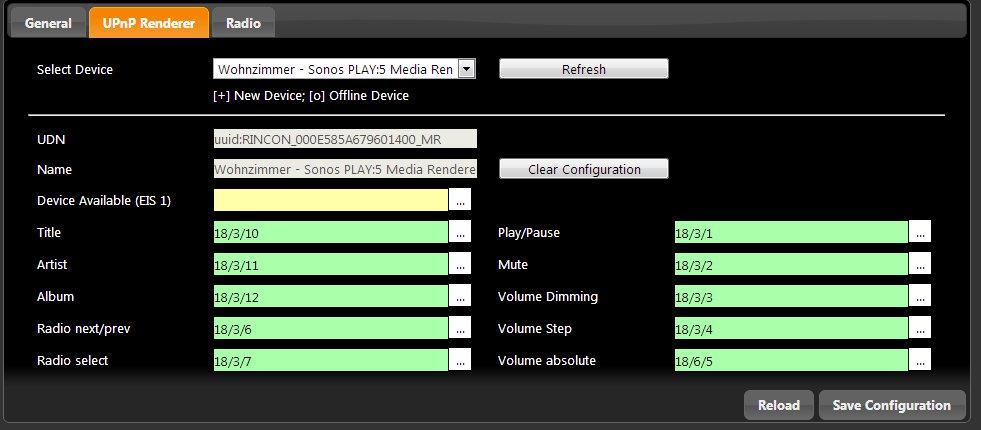
Group addresses assigned by the UPnP devices can be controlled via KNX.
Title (EIS 15)
About this group address the current title of the radio station will be sent as a text output on the bus, 15 of the EIS. Information can only be made available when this is present.
Artist (EIS 15)
Group address to the text output of the current artist. (EIS 15 value). Information can only be made available when this is present.
Album (EIS 15)
This group will address the current issue album title. (EIS 15 value). Information can only be made available when this is present.
Radio front / back (EIS 1)
The object for switching radio stations forward / back. (EIS 1: 0 = BACK, 1 = ON).
Radio selection (EIS 14)
Group address for selection of favourite radio stations that have been created and managed under the radio (see radio). The list of radio stations beginning with 0, the position of favourites can be connected to a EIS14 button. By specifying the value in EIS14 button can be called the favourite desired (e.g., 2 for 1Live). ICE CREAM 14 Value.
Play / Pause (EIS 1)
With this object, turn the UPnP playback devices on or off. (EIS 1: 0 = OFF 1 = ON)
Mute (EIS 1)
The group addresses for the mute (Mute). Muting the effect that the song is stopped, and again on Mute OFF continues (EIS 1: 0 = OFF MUTE, AN 1 = mute).
Volume dim (ICE 2)
With this object, the volume can be adjusted continuously, (dim) EIS 2.
Volume up / down (EIS 1)
About this object is in the volume gradually increased or decreased, (EIS 1: 0 = quiet, 1 = up).
Absolute volume (EIS 6)
This group address, it is possible to set an absolute volume. EIS6 value (0-100%).
Save
After editing the objects care must be taken to "save", because otherwise all will be deleted.
Delete Configuration
By "clear configuration" started the group addresses are removed.
Reload
"Reload" reloads the current configuration EIBPORT.
Radio
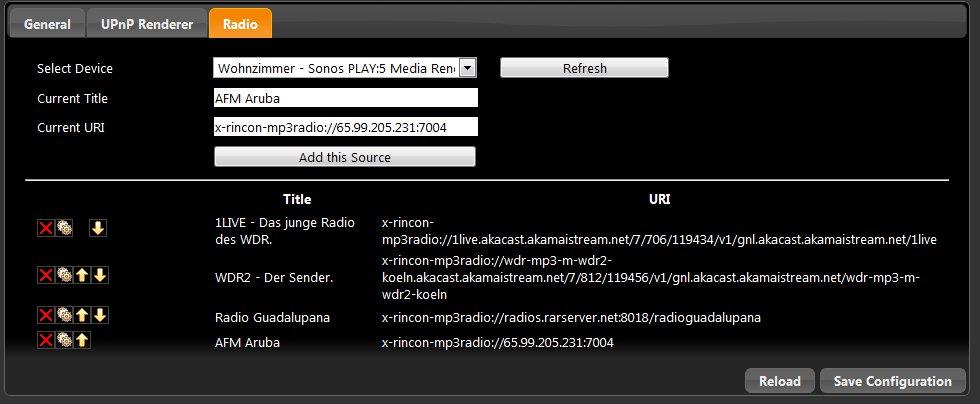
In this window, transmitters can be added, assigned to a specific telegram value and managed. The transmitters were previously searched for and started via the UPnP device.
As soon as the transmitters are played back, they can be saved together with an associated ID (telegram value). This makes it possible to select the transmitters later using the telegram value.
Update
Radio station to take the straight instrument is played by UPnP.
Add current stream
Radio stations to add to your favourites list.
Delete
Delete the X from the transmitter (title) will be deleted.
Radio Edit
Manual change of title and URI.
Arrow keys
The station IDs are sequential starting with 0 The order of stations can be changed using the arrow keys.