
BAB STARTER allows you to automatically detect compatible BAB TECHNOLOGIE devices on the local network and display their device information.
For web-based devices that do not provide Java-based applications through BAB STARTER, the user interface is accessed using the operating system's default web browser.
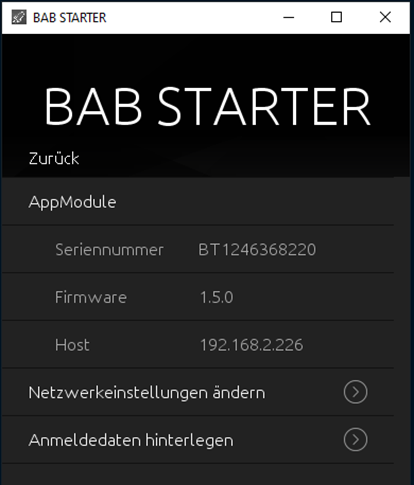
The Device Menu displays the available device information, including:
-
Device Name: Custom name assigned to the device.
-
Serial Number: Unique serial number of the device.
-
Firmware: Currently installed firmware version.
-
Host: Hostname or IP address of the device.
Supported Devices
Supported web-based BAB TECHNOLOGIE devices include:
-
APPMODULE
-
DATALOGGER
-
KNXCONVERTER
-
AUDIOMODULE
-
AUDIOSERVER
-
INTERCOMMODULE
-
LINKMODULE
-
LOGIKMODULE
-
ELMMODULE
-
DUODMX GATEWAY
-
FACILITYMASTER
Access the Device Interface
To access the web-based user interface of a device, follow these steps:
-
Open the Device Menu of the desired device in BAB STARTER.
-
Locate the IP address or hostname displayed in the “Host” field.
-
Open your operating system's default web browser.
-
Enter the IP address or hostname in the browser's address bar.
-
If required, log in using the appropriate credentials.
You can then access the available functions and configuration options of the device.
///