
In order to open the EnOcean Editor please follow the description in chapter “EnOcean Editor”!
Operating principle EnOcean
An EnOcean radio network consists of sensors and actuators. The sensors utilize your ambient energy to transmit the corresponding radio signal. So that an actuator can interpret and respond to the signals of a sensor, the actuator must be adapted to the sensor. The so-called EnOcean Profiles (EEP) determine how the data provided by the sensor are to be interpreted. Thus, it is important that sensor and actuator utilize the same EnOcean Profile (EEP).
Device categories / sensors
EnOcean distinguishes between three device categories in its sensor technology. The device category gives information about the kind of EnOcean signal involved and simultaneously about what the receiver can expect.
-
Switch module: A module which sends out a corresponding radio signal via user interaction. That is switches, rockers, position and key card switches as well as window handles.
-
1 byte sensor: A sensor which sends out information of 1 byte size.
-
4 byte sensor: A sensor which sends out information of 4 byte size.
Actuators
Actuators will perform their controlling on the basis of sensor signals. Therefore, sensor and actuator have to be adapted to each other. Thus, it is important to know which EnOcean profile is to be emulated to address a LINKMOUDULE actuator correctly. The actuator manufacturer will inform you about which profile the actuator utilizes.
EnOcean Profiles (EEP)
The EnOcean profiles (EnOcean Equipment Profile - EEP) define the device category, the function and the device specification. During the CUBEVISIONMODULE configuration, the KNX parameters automatically adapt to the selected profile. The profile consists of 3 number pairs separated by a hyphen: XX-XX-XX
The different positions represent the following: ORG-FUNC-TYPE
-
ORG determines which messages form the communication base (see also 'Device categories/sensors').
-
FUNC determines which device is involved, that is e.g. a switch or a temperature sensor.
-
TYPE determines the exact specifications of the device functionality.
Transmitter ID (Trans. ID)
Is a definite device address which only exists once? This address allows the sending device to be identified.
Teaching Telegram / LRN Telegram
Is a special telegram used to "teach" the sensor to recognize the actuator, that is, to adapt the actuator to the sensor? It is important for the actuator to know from which hardware address it gets its sensor data. There are several kinds of adapting mechanisms. Please consider the respective descriptions.
EnOcean Configuration
The CUBEVISIONMODULE internally works with the KNX group address system. In order to continue to use received EnOcean signals within the device or to trigger EnOcean telegrams, KNX group addresses must be used. You will find information about this in chapter "KNX Addressing".
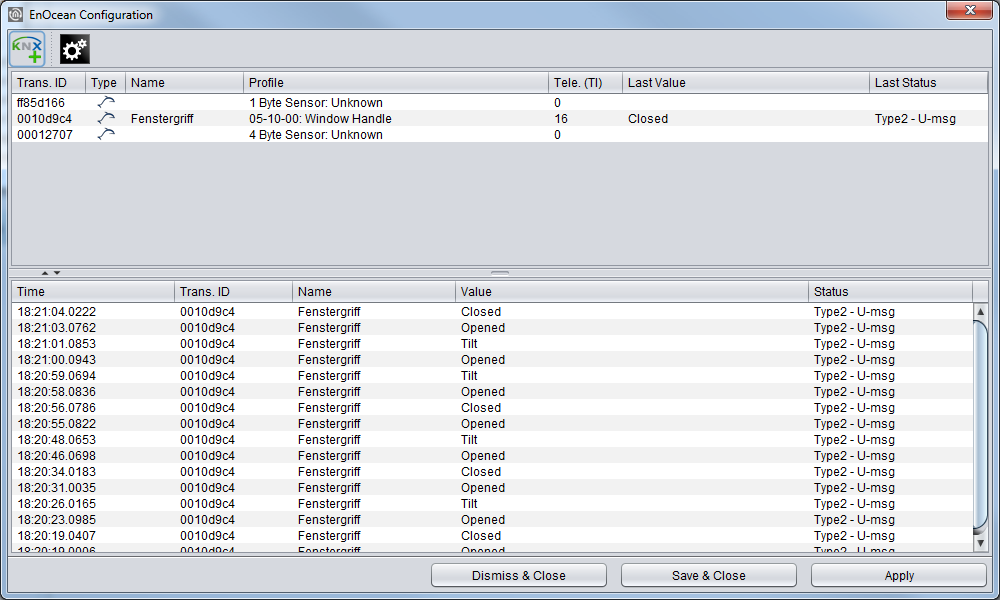
In order to access the corresponding CUBEVISIONMODULE configuration mask, open the menu "configuration" – "EnOcean Editor". Java Applets must be able to be started (please note also the indications in chapter "EnOcean Editor"). The window generally consists of 3 areas:
-
(Red) Configuration Menu: Basic settings of the EnOcean module are adjusted here and the EnOcean devices are emulated.
-
(Blue) Device List: All EnOcean devices are ordered and listed here in the order of their device ID (Trans. ID).
-
(Green) Telegram List: All received EnOcean telegrams are listed here in the order of their arrival time.
Additionally, at the bottom of the window there are the action buttons available for securing or discarding the settings.
EnOcean Settings

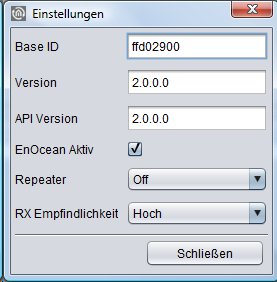
The EnOcean settings display the hardware parameters of the built-in EnOcean module (TCM 300 transceiver). The following settings can be configured:
EnOcean Active
You can use this to switch the module on or off.
Repeater
The repeater function is used to relay a received signal in order to extend its range. The following settings are available:
-
Off: The repeater function is switched off.
-
Level 1: The telegram is repeated by only one repeater.
-
Level 2: The telegram is repeated by two repeaters.
RX Sensitivity
Set the reception sensitivity at which the EnOcean module should operate. You can choose between ‘Low’ and ‘High’.
Adapting the EnOcean device
All EnOcean devices within range are displayed both in the device list and in the telegram list as they are sending something. As already mentioned, the EnOcean telegram must be connected with a group address in order to make it usable for the CUBEVISIONMODULE. This is done as follows:
-
Mark the device of interest in the device list.

If you are not sure which device has which Trans. ID, activate the device of interest and look up in the device list for which device the telegram counter increases (column "telegrams").
-
When you have detected the device of interest, mark it with the mouse, press the right mouse button and click 'Properties'. Alternatively, double-click on the device.
-
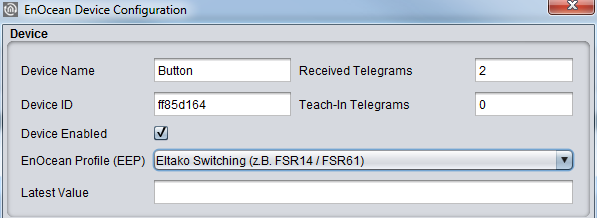
The window "EnOcean Device Configuration" will open. Via this dialogue, the EnOcean devices will be "adapted.
-
Initially, assign a definite "Device Name", referring to the device function. In the input screen, you will further find the following parameters:
-
Device ID: This is the unique device address through which the device is identified.
-
Received Telegrams: Here, the number of telegrams already received by the CUBEVISIONMODULE from this device is counted.
-
Teach-in Telegrams: If the device should send teach-in telegrams, their number is shown here.
-
Device Active: If you would like to keep the device in the EnOcean configuration without using it, you can deactivate it for the CUBEVISIONMODULE usage via this option.
-
EnOcean Profile (EEP): The different EnOcean devices are defined via so-called profiles. Hereby, the device category involved is detected as early as at the signal input and a pre-selection is made. Then it is also possible to select from the profiles known from the CUBEVISIONMODULE. As soon as a profile is selected, the corresponding KNX parameters are shown underneath.
-
Last Value: This field interprets the payload of the last radio signal from this device ID according to the selected profile. If there is no profile selected, the crude data are shown.
-
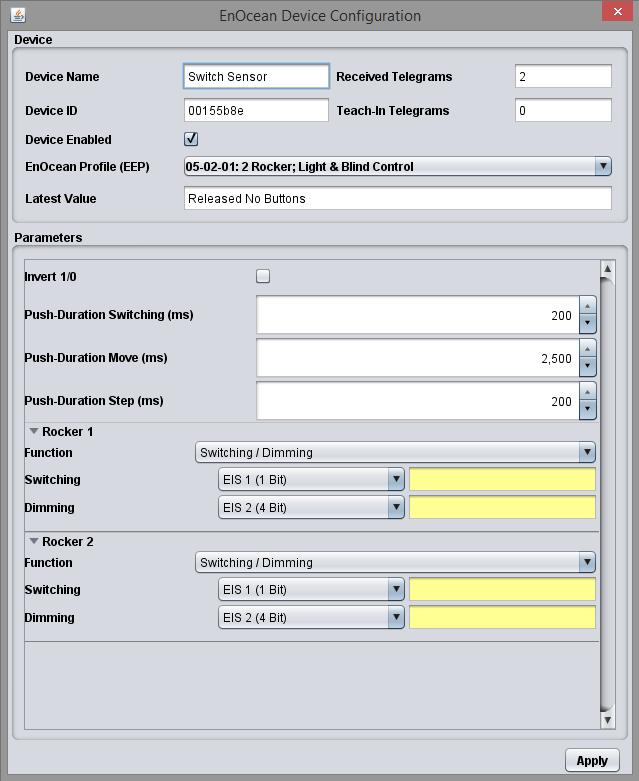
Select the corresponding profile of your EnOcean device. If you are not sure about which profile your device 'speaks', please contact the manufacturer of the device. After the right profile has been selected, one or more input fields appear in the "Parameters" area:
Different parameters appear depending on which profile has been selected. If one switch (rocker) has been selected, various additional functions can be carried out (see chapter "Configuration example for EnOcean button").
-
Now, enter the corresponding KNX group addresses in the address fields to obtain a connection to the selected EnOcean device. You will find detailed information about the KNX group addresses and their assignment in chapter "KNX Addressing".
-
When you have entered the addresses in the parameters as requested, close the EnOcean Device Configuration window.
-
Save the changes in the window "EnOcean Configuration" via the button „Save & Close“ or "Assume" (the window stays open).
As soon as this step is taken, the entered KNX telegrams are triggered via EnOcean signals. In order to be able to use the addresses more easily later, you should enter them into the ESF data with a definite designation (see Chapter "KNX Addressing")
Emulating EnOcean devices
The CUBEVISIONMODULE provides a Transceiver Module which not only permits receiving but also sending EnOcean telegrams. In order to do this, the CUBEVISIONMODULE emulates an EnOcean device. Via a configuration mask, you can determine which device is emulated with which KNX telegram by the CUBEVISIONMODULE (the device internally works with KNX group addresses also during the EnOcean execution).
Assigning a new emulated device
In order to assign a new device, please click the KNX logo in the configuration menu ("Editor" > "Extras" > "EnOcean Configuration"). Thus, a window designated "New Emulated Device" will open.
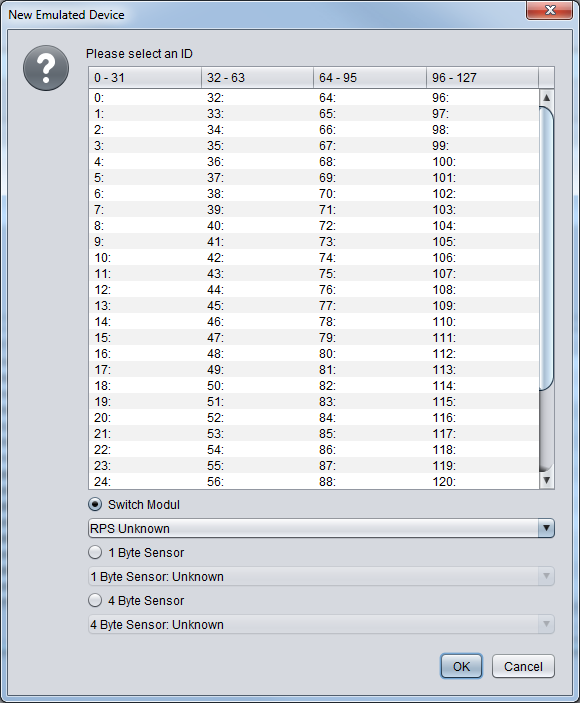
In the upper half of the window, you will be asked to choose a hardware address. The address is unique and 128 different addresses can be assigned in total. If a device has already been assigned, the device name is highlighted in red on the ID list.
Selecting the device category
Depending on which actuator is to be controlled by EnOcean, the appropriate device category has to be selected. Additionally, the appropriate profile can be preselected directly beneath the corresponding category. By confirming with "OK", the settings will be confirmed and the "EnOcean Device Configuration" window will open.
Defining emulated device ("EnOcean Device Configuration")
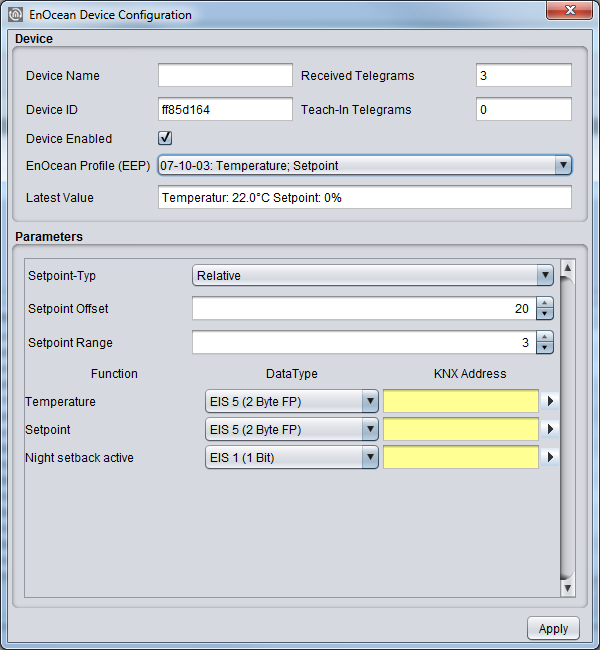
The device assigned in this way is initially provided with a definite device name. Additionally, the following parameters are presented (see also chapter "Example: Emulate temperature sensor")
-
Device ID: Is the definite hardware address you have selected before. Cannot be modified at this point.
-
Received Telegrams: Shows the number of telegrams already received from this hardware address. In an emulated device, this number should generally be "0".
-
Teaching Telegrams: Shows the number of "teaching telegrams" already sent from this hardware address.
-
Device Active: If you would like to keep the device in the EnOcean configuration without using it, you can deactivate it for the CUBEVISIONMODULE usage via this option.
-
-
EnOcean Profile (EEP): Here, the profile the emulated device should use is selected. The profile settings depend on the actuator to be communicated with. If the profile is unknown, the manufacturer of the actuator can provide information.
-
Last Value: This field interprets the user data from the last telegram according to the selected profile or simply displays it.
After all settings have been performed as requested, continue with the corresponding KNX parameters in the lower window section. These comply with the profile and are sent as KNX telegrams when there has been an EnOcean signal detected at receipt.
Example: Emulate temperature sensor
Profile: "07-10-03 temperature, target value" is selected as the profile.
Parameters
According to this profile, the following parameters are available:
-
Basic Target Value: Enter the basic target value for the actuator here. 20°C are preselected.
-
Maximum Target Value Modification: Enter the maximum value in °C to modify the target value here. 3°C are preselected here.
-
Temperature: Enter the group address transmitting the current temperature value (data type EIS 5) here.
-
Target Value: Enter the group address to modify the absolute target value (data type EIS 5) here
-
Sending Teaching Telegram: When the corresponding actuator is in the "learning" mode, the emulated sensor can be adapted via this trigger.
When all parameters are set as required, close the window "EnOcean Device Configuration" and save your settings via the "Save & Close" or "Accept" button.
KNX Addressing
The CUBEVISIONMODULE addressing concept is based on the group addressing of the KNX system. Sending EnOcean Telegrams as well as transmitting received telegrams is performed based on KNX group addresses only. The KNX group address is a 16-bit address which is split in a so-called 'real' and a 'virtual' section. Additionally, there is a 2-digit as well as a 3-digit representation:
-
3-digit:
MG= Main Group / CG= Central Group / SG= Subgroup
MG / CG / SG -
2-digit:
MG= Main Group / SG= Subgroup
MG / SG
The CUBEVISIONMODULE interface only supports the 3-digit representation.
Real / Virtual Address Space
The KNX address space ranges in total from 0/0/0 to 31/7/255 (in the 3-digit representation). Therein, the range from 15/7/255 is designated as real address space and the address space from 16/0/0 to 31/7/255 as virtual address space.
For the communication between EnOcean and KNXnet/IP routing, only the real address space is used.
Configuration example for EnOcean button
In the following, an exemplary configuration for sending and receiving of an EnOcean button profile (profile "05-02-01: 2Rockers, Light & Blind") is shown.
CUBEVISION MODULE as the receiver (actuator)
This switch provides either one or two rockers and transmits their status within a radio signal. In order to link these radio signals with KNX, various functions are available:
-
Switch / Dim: The EnOcean push button can be used as a switch and as a dimmer. Thereby, a long keystroke is interpreted as a dim command.
-
Push Button: When pushing the button, an EIS 1 telegram of the value 1 is triggered. When 'letting go', a telegram of the value 0 is triggered. One address can be assigned per position respectively (I and O).
-
Switch: When pushing the button, the status is only changed once; either a 1 or a 0 is sent.
-
Blind: For the "Move" and the "Step" commands, there is one address entered respectively (EIS 1).
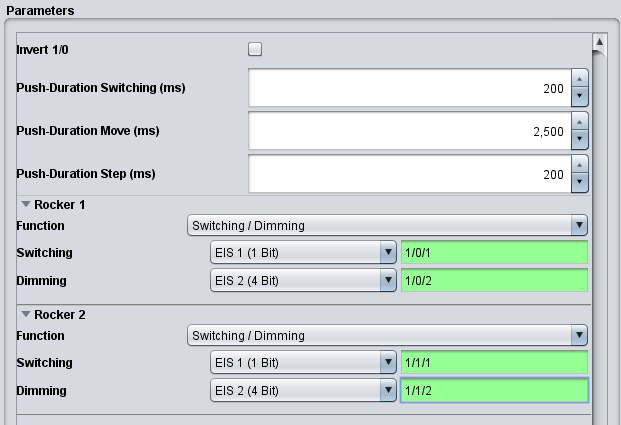
Additionally, the output to the KNX addresses can be inverted. In this case, the actual output "1" becomes "0" and vice versa.
CUBEVISION MODULE emulates EnOcean push button
When the profile mentioned above is emulated by the CUBEVISIONMODULE, the parameter screen looks slightly different. The "switch" is missing as this function cannot be carried out with EnOcean.
Functions
-
Switch / Dim: There is one switch and one dim address for each rocker. The information on if it was switched or dimmed is sent in the KNX via different group addresses.
-
Push Button: For the button, there is one address for the value "0" and one for the value "1". At reception on the respective input object, the corresponding EnOcean signal is transmitted.
-
Blinds: The blind control also consists of two EIS 1 objects. One is for the 'Move' command ("1"), the other one for the 'Step' command ("0").
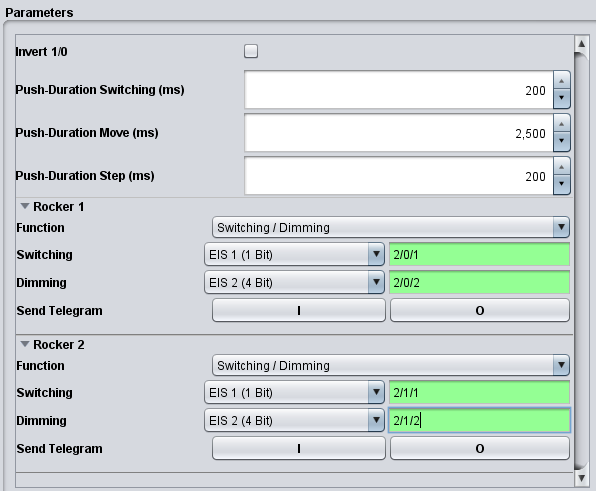
Sending a Telegram
These buttons may be used to adapt the emulated device to the actuator of interest. These two buttons simulate the respective rocker directly from the EnOcean configuration.
Inverting
The respective EnOcean output values are inverted. The "1" becomes a "0" and vice versa.
///